OpenNebula in depth
Learning goals
After this chapter you can:
- Name the OpenNebula services on the front-end and what each one does
- Explain how oned, the scheduler, monitoring and the drivers work together
- Find the datastores for system disks, images, files and backups in the lab
- Tell the network modes bridge, 802.1Q and VXLAN apart by the devices they create on a node
- Describe how the CLI, Sunstone and OpenTofu use the oned API
- Follow a VM from its template to a running process on a node
Chapter 2.1 gives an overview of the building blocks of OpenNebula. This supplement goes one level deeper, to the processes, files and devices you find on your servers. The examples use the code mmuster with the front-end at 192.168.210.137, the nodes at .138 and .139, the VXLAN identifier 5862 and the interface eth0. Use your own values instead.
The oned daemon
Section titled “The oned daemon”At the core of OpenNebula sits the program oned, which systemd runs as the service opennebula. It accepts every request through the API, checks permissions and quotas, and keeps the state of all objects in a database, each object stored as an XML document. OpenNebula uses SQLite unless configured otherwise, and OneDeploy sets up MariaDB in the lab. onevm show <vm> -x prints such a document. Settings live in /etc/one/oned.conf and messages in /var/log/one/oned.log, as the oned documentation describes.
oned hands the actual work on hosts, VMs and disks to drivers, separate programs it launches at startup. onemonitord collects monitoring data, one_sched places new VMs, one_vmm_exec controls the VMs, one_tm moves disks to the nodes and one_datastore manages the images. All of them run as the user oneadmin.
systemctl status opennebula --no-pagerps -u oneadmin -o pid,args | grep -E 'oned|onemonitord|one_'The second command lists oned and the drivers it started, each with its arguments.
Scheduler and monitoring
Section titled “Scheduler and monitoring”In OpenNebula 7.4 the scheduler is a driver too, configured as SCHED_MAD in oned.conf. oned asks it for a plan for the pending VMs and then carries out that plan itself. -p rank selects the rank scheduler from chapter 2.5 for the initial placement. -o one_drs adds the Distributed Resource Scheduler, which can rebalance running VMs.
oned collects pending VMs in a window. With the defaults that ship with OpenNebula 7.4, the window closes after ten seconds or as soon as more than seven VMs are waiting. If the scheduler finds no room for a VM, oned asks again after 60 seconds. Each host runs at most one scheduled deployment or migration at a time, as the scheduler documentation explains. A new VM can therefore sit in pend for a few seconds even when there is room.
sudo sed -n '/^SCHED_MAD/,/^MAX_ACTIONS_PER_CLUSTER/p' /etc/one/oned.confThe output shows the driver with its arguments, the limits of the window, the retry interval and the actions allowed per host.
onemonitord supplies the state of hosts and VMs and listens on port 4124 for both UDP and TCP. On each node, OpenNebula starts a small agent over SSH that runs the probes from im/kvm-probes.d/ and pushes the results to the front-end on its own. According to the monitoring documentation, a heartbeat and the state and usage of the VMs arrive every 30 seconds, the load of the host every 120 seconds. When the heartbeats stop, OpenNebula restarts the probes. If that fails, onehost list shows the node as err.
sudo ss -tulpn | grep 4124onehost show <node>ss shows onemonitord on port 4124 for TCP and UDP. onehost show gives the time of the last report under LAST MONITORING TIME and the reported values in the section MONITORING INFORMATION.
Web interface and add-on services
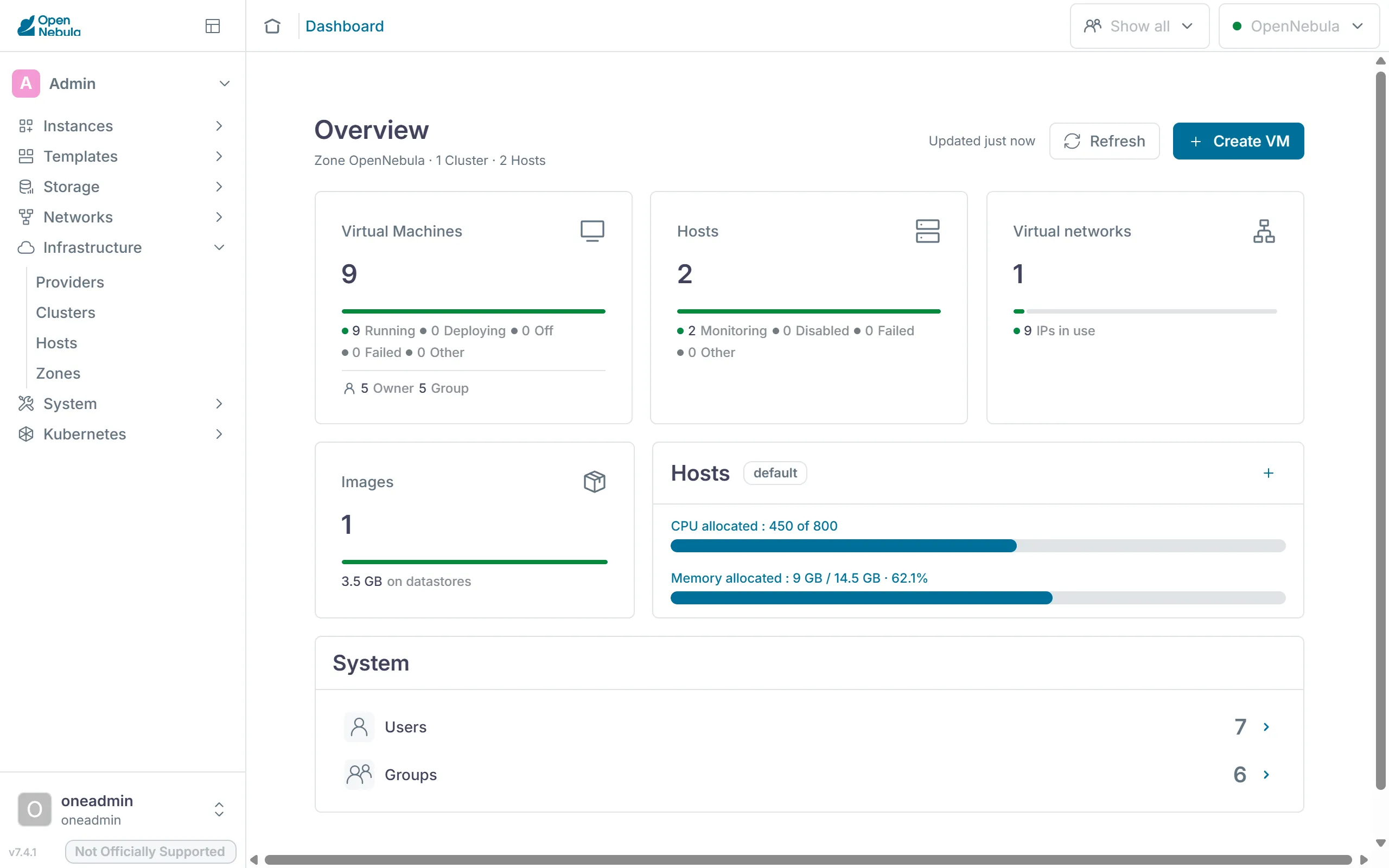
Section titled “Web interface and add-on services”Sunstone is a React application served by FireEdge. FireEdge runs on Node.js as the service opennebula-fireedge on port 2616. For every action it calls the same XML-RPC API as the CLI, at http://localhost:2633/RPC2. A VM console in the browser goes through guacd on port 4822, the Apache Guacamole proxy, which connects to the VM over VNC. The views from chapter 3.4 live in /etc/one/fireedge/sunstone/, as the FireEdge documentation describes.
The menu on the left divides Sunstone into sections such as "Instances", "Templates", "Storage", "Networks", "Infrastructure" and "System".
OneFlow runs as the service opennebula-flow on port 2474. It manages services made of several VMs, with roles and elasticity rules. In this course OneFlow belongs to the advanced tasks of milestone 1, which chapter 3.5 describes. It stores service templates and services in oned as documents, which is why the member groups need the right to create documents. OneFlow starts its VMs through the API like any other client.
OneGate runs as the service opennebula-gate on port 5030 and accepts reports from VMs, such as custom metrics for a OneFlow rule. A VM identifies itself with a token from its context. By default OneGate only accepts requests from the front-end itself, as ss shows in chapter 2.2. The VMs in cc-net cannot reach it, so OneGate stays theory in this course.
All three services sit on top of oned. If one of them stops, the VMs keep running and the CLI works as before.
systemctl is-active opennebula-fireedge opennebula-guacd opennebula-flow opennebula-gatesudo journalctl -u opennebula-fireedge -n 20 --no-pagerThe first command reports active for each of the four services, the second shows the latest FireEdge messages.
Drivers
Section titled “Drivers”Behind each driver are small Ruby and shell programs, one per action. On the front-end they live in /var/lib/one/remotes/. Whatever has to run on the nodes, OpenNebula copies to /var/tmp/one/ once it monitors a node. After a change, onehost sync -f copies the files again, as the host documentation describes.
| Driver | Program on the front-end | Actions in remotes/ | Example in the lab |
|---|---|---|---|
| Monitoring (IM) | onemonitord | im/kvm-probes.d/ | Probes for the host and its VMs run on every node |
| Virtualization (VMM) | one_vmm_exec | vmm/kvm/ | deploy starts a VM with virsh create |
| Transfer (TM) | one_tm | tm/ssh/ | clone copies an image to the node over SSH |
| Datastore (DS) | one_datastore | datastore/fs/ | cp stores a new image as a file in the datastore |
| Network (VNM) | none of its own | vnm/vxlan/ | pre before a VM starts, post after, clean when it stops |
The network driver has no program of its own. one_vmm_exec calls its actions when a VM starts, migrates or stops. OneDeploy registered both nodes with kvm for monitoring and virtualization.
onehost show <node> | grep -E 'IM_MAD|VM_MAD'sudo ls /var/lib/one/remotes/ssh mmuster-node1 sudo ls /var/tmp/one/In /var/tmp/one/ on the node you find the folders from remotes again, such as im, vmm and vnm.
Datastores
Section titled “Datastores”OneDeploy created three datastores, and chapter 6.2 adds one for backups. An image datastore has two drivers. DS_MAD manages the images, in the lab fs with plain files. TM_MAD moves the disks to the VMs, in the lab ssh. A system datastore holds the disks of running VMs and only has a transfer driver.
| Datastore | Type | Contents | Location in the lab |
|---|---|---|---|
0 system | SYSTEM_DS | Disks and files of the VMs | on each node for its running VMs, on the front-end for VMs in unde |
1 default | IMAGE_DS | Images such as ubuntu-26.04 | /var/lib/one/datastores/1/ on the front-end |
2 files | FILE_DS | Kernels, ramdisks and context files | /var/lib/one/datastores/2/ on the front-end |
backups | BACKUP_DS | VM backups | on the front-end named in RSYNC_HOST |
With ssh, every node has its own part of datastore 0 under /var/lib/one/datastores/0/, with one folder per VM. The folder holds the VM's disk disk.0, a standalone copy of the image, the context as disk.1 and the files the VM driver places there at boot. If a node fails, nobody can reach these disks, as chapter 2.5 explains.
The local storage documentation lists ssh as a legacy driver in OpenNebula 7.4 that is still supported. For new datastores it defaults to local, which also copies over SSH but uses qcow2 features such as thin provisioning. With mode: ssh from the inventory in chapter 2.2, OneDeploy creates the legacy one.
onedatastore listonedatastore show 0ssh mmuster-node1 sudo ls /var/lib/one/datastores/0/onedatastore list shows the type, drivers and free space of each datastore. On the node you see one folder for each VM running there, named after its ID.
Network modes
Section titled “Network modes”The network drivers build their networks from Linux kernel devices. The documentation covers the bridge, 802.1Q and VXLAN modes one by one. The supplement Linux networking in the lab shows how to inspect these devices.
| Mode | Devices on the node | What it needs from the network below |
|---|---|---|
bridge | A bridge holding the node's interface and the VM NICs | The switch lets the VMs' MAC addresses through |
802.1Q | One VLAN device per network, such as eth0.50, in its own bridge | The ports are trunks carrying these VLANs, and the node loads the 8021q module |
vxlan | One VXLAN device per network, such as eth0.5862, in its own bridge | The nodes reach each other over IP, and multicast reaches the group |
With bridge, the node's interface itself is a port of the bridge, so the node's address sits on the bridge. OneDeploy sets up such a bridge with netplan when the inventory contains a network of this kind, for example under the name br0. Your inventory contains none, so your nodes keep their address on the interface.
With vxlan, pre creates the bridge and the VXLAN device as soon as the first VM of the network starts on a node. The device is named after the interface and the identifier, eth0.5862 in the example. When the last VM of the network leaves the node, clean deletes both again. A VM NIC is named one-<vm>-<nic>, so the first NIC of VM 12 is one-12-0.
With fw, 802.1Q and vxlan, post also sets iptables rules for the security groups. Every new network gets the group default with ID 0, which allows all traffic. That is why cc-net does not filter anything either.
onevnet show cc-net | grep -E 'VN_MAD|PHYDEV|BRIDGE|VLAN_ID|SECURITY_GROUPS'ssh mmuster-node1 'ip -d link show eth0.5862; ip link show master ccbr5862'On a node with a VM in cc-net, ip -d link shows the VXLAN device with identifier, group and port. ip link show master lists the devices in the bridge, the VM NICs among them.
API and clients
Section titled “API and clients”Every client talks to oned through the XML-RPC API at http://<front-end>:2633/RPC2. Each call starts with a session string, which is user:password for a password login. The response reports success or failure, then the result or an error message, and an error code. Every CLI command calls such methods. onetemplate instantiate, for example, calls one.template.instantiate.
The CLI consists of Ruby programs. It takes the API address from ONE_XMLRPC and falls back to http://localhost:2633/RPC2. It reads user and password from the file named in ONE_AUTH, otherwise from ~/.one/one_auth, as the CLI configuration describes. That is how you worked as a member in chapter 3.1. Sunstone reaches the API through FireEdge, OpenTofu through the provider from chapter 4.2. oned also accepts the same calls over gRPC on port 2634, which the documentation presents as the faster option for large installations. The CLI only uses gRPC with the --grpc option.
Since every path ends at oned, oned checks permissions on every call. A Sunstone view only hides tabs. Whether a request is allowed is up to oned, as chapter 3.4 shows.
onezone show 0 | grep ENDPOINTonevm list -x | head -20The first command shows the API address registered in the zone. The second shows the answer of one.vmpool.info as XML, the way it travels over the network.
Users, groups, VDCs and ACLs
Section titled “Users, groups, VDCs and ACLs”Every object belongs to a user and a group and carries permissions for the owner, the group and everyone else, much like a file on Unix. oneadmin with ID 0 and the members of the group oneadmin may do everything. OpenNebula also creates the service user serveradmin, through which OpenNebula services pass on requests of their users to oned. ACLs grant users or groups additional rights on whole kinds of objects. A VDC assigns clusters, hosts, networks and datastores to groups, and a group without a VDC of its own belongs to default with all clusters. Chapter 3.1 builds the members from these pieces, and chapter 3.4 shows the order in which oned checks permissions.
oneuser listonevdc listoneacl listoneuser list shows serveradmin next to oneadmin and the group admins. oneacl list contains the rules that onegroup create added for the members.
The path of a VM
Section titled “The path of a VM”Chapter 2.1 describes the path of a VM in five steps. Here you follow it down to files and processes, for a VM with ID 12 on node 1.
onetemplate instantiate ubuntu sends one.template.instantiate to oned. oned checks permissions and quota, creates the VM in the database, gives its NIC an address from cc-net and starts the log /var/log/one/12.log. The VM sits in pend until the scheduler window closes. The rank scheduler drops the nodes without room, ranks the rest and returns its plan. oned records the chosen node in the history of the VM, which onevm show lists under VIRTUAL MACHINE HISTORY.
In the prol state, the transfer driver ssh copies the image as disk.0 to /var/lib/one/datastores/0/12/ on the node. Then comes boot. oned writes the libvirt description of the VM to /var/lib/one/vms/12/deployment.0. In it the VM is called one-12, and its NIC one-12-0 is attached to the bridge ccbr5862. one_vmm_exec then runs a fixed sequence of steps. First the context is created as the ISO image disk.1. pre creates the bridge and the VXLAN device if the node lacks them. deploy stores the description next to the disks and starts the VM with virsh create. Finally post sets the security group rules.
Once libvirt has created the VM, it moves to runn, and the agent on the node reports its state every 30 seconds. Inside the VM, the context package reads disk.1 and sets up the address, hostname and keys, as chapter 2.4 explains. The state reference describes every state along the way.
onevm show <vm>sudo tail -n 30 /var/log/one/<vm-id>.logssh mmuster-node1 'sudo virsh list; sudo ls -l /var/lib/one/datastores/0/<vm-id>/'The log lists every state change and every driver action with a timestamp. virsh list shows the VM as one-<vm-id>. The folder holds the disks, deployment.0, and the files vm.xml and ds.xml, which the VM driver places there before the start.
Exercise Lab
Pick a running VM, such as web-1 from chapter 2.4 or, from part 4 on, k3s-agent. Use the commands on this page to find out which node it runs on, what libvirt calls it, which bridge its NIC is attached to and which files sit in its folder in datastore 0. For each file and device, explain which driver created it.
Solution
onevm show gives the ID of the VM and, under HOST, its node. There sudo virsh list shows the VM as one-<id>. ip link show master ccbr<identifier> lists the VXLAN device and the NIC one-<id>-0. The vxlan network driver created the bridge and the VXLAN device with pre, and libvirt created the NIC when deploy started the VM. The folder /var/lib/one/datastores/0/<id>/ holds disk.0, the copy of the image made by the transfer driver ssh. The context in disk.1 comes from a transfer driver step at boot. oned wrote deployment.0, and the VM driver places vm.xml and ds.xml before deploy starts the VM through libvirt.
Text and figures are licensed under CC BY-SA 4.0 and the code under the MIT License. The sources are on GitHub.