Virtual networks
Assignment
"The members ask whether their servers reach the internet and whether anyone can see them from outside," Simone Wyss writes. "Can you set up a network for our VMs without us having to change anything on the existing network?"
Learning goals
After this chapter you can:
- Tell the network drivers of OpenNebula apart and justify VXLAN
- Create the internal network of your cloud from your parameters
- Explain what an address range and a lease are
- Describe how network, gateway and NAT work together
- Explain what an overlay network is and why the MTU drops to 1450 bytes
Network drivers
Section titled “Network drivers”A virtual network in OpenNebula describes how VMs connect to a network. The network driver decides how that happens on the nodes.
| Driver | How it works | Suitable when |
|---|---|---|
bridge | The VMs connect directly to the node's network through a Linux bridge. | the node's network accepts foreign MAC addresses |
802.1Q | Each virtual network gets its own VLAN on the physical network. | the switch provides VLANs for the nodes |
vxlan | The VMs' network travels in UDP packets across the existing network between the nodes. | the existing network should know nothing about the VMs |
ovswitch | Open vSwitch instead of a Linux bridge, with features such as flow rules | large installations with special requirements |
Your lab uses vxlan. Of your cloud, only the front-end and the nodes appear on the lab network, while the VMs inside it stay invisible there. That is why the lab also works on smartlearn, where the hypervisor does not let foreign MAC addresses through.
The three drivers based on Linux bridges differ mainly in how much the physical network has to know about the VMs. With bridge the switch sees the MAC address of every VM, and the VM network is the node network. 802.1Q separates networks with a VLAN tag inside the frame. The tag has 12 bits, which allows at most 4094 networks, and every switch between the nodes has to be configured for those VLANs. vxlan only needs the nodes to reach each other over IP. Its identifier has 24 bits, enough for about 16 million networks. The price is 50 bytes per packet, and frames to everyone need multicast. The networking overview of OpenNebula 7.4 describes every variant.
Overlay networks
Section titled “Overlay networks”An overlay network is a virtual network built on top of an existing one. The existing network is called the underlay, and in your lab it is the lab network with the addresses of the front-end and the nodes. The nodes themselves are the endpoints of the overlay. They wrap VM traffic in ordinary IP packets addressed to another node, and the underlay carries those packets like any other traffic. To the VMs it looks as if they all hang off the same switch, even when they run on different nodes. The result is a layer 2 network stretched across a layer 3 network, and the underlay never learns the IP or MAC addresses of the VMs. Clouds like overlays because a tenant can create a new network without anyone touching the physical network.
VXLAN (Virtual Extensible LAN) wraps every Ethernet frame of a VM in a UDP packet and sends it across the lab network to the node that runs the target VM. There the kernel unwraps the frame again. An identifier between 1 and about 16 million keeps the networks apart. In your lab it is CC_VNI from your parameters. Frames to everyone, such as ARP requests, go to a multicast group that OpenNebula derives from 239.0.0.0 and the identifier. The gateway on the front-end joins the same group and so belongs to the same network.
RFC 7348 defines the packet layout. In front of the VM's frame the node puts an 8-byte VXLAN header whose main content is the 24-bit identifier, the VXLAN Network Identifier or VNI. A UDP header and an IP header come before that, with the two nodes as source and destination. The receiving node reads the VNI and hands the frame only to the bridge of the matching network. That keeps the networks of different tenants apart even though their packets share the same wire. IANA assigned UDP port 4789 to VXLAN. The Linux kernel still defaults to the older port 8472, and OpenNebula keeps that value, as its VXLAN documentation states. That is why lab/cc-gateway.sh also sets dstport 8472 on the front-end. With any other port the packets from the nodes would never arrive there.
A packet on the lab network may be 1500 bytes long. The outer IP header takes 20 of them, the UDP header 8, the VXLAN header 8 and the Ethernet header of the inner frame 14. The VM loses those 50 bytes, which leaves 1450 bytes for its IP packet. The nodes do not split oversized packets, because RFC 7348 forbids the endpoints to fragment them. If the VMs send larger packets, those get lost, and HTTPS downloads break off while small requests still work. The network therefore passes an MTU of 1450 to the VMs through GUEST_MTU and the context.
Creating the internal network
Section titled “Creating the internal network”The script lab/iaas/make-network.sh writes the template of the network from your parameters. It reads the interface that carries the VXLAN on node 1.
~/cc/lab/iaas/make-network.sh > ~/cc-lab/cc-net.tplonevnet create ~/cc-lab/cc-net.tplonevnet listNAME = "cc-net"DESCRIPTION = "Internal network of the cloud, gateway and NAT on the front-end"
# VXLAN carries the network over the lab network, the gateway on the front-end uses the same idVN_MAD = "vxlan"PHYDEV = "$PHYDEV"VLAN_ID = "$CC_VNI"BRIDGE = "ccbr$CC_VNI"
# The VXLAN header takes 50 of the 1500 bytes, the guests have to know thatGUEST_MTU = "1450"
AR = [ TYPE = "IP4", IP = "$CC_GUEST_FIRST", SIZE = "$CC_GUEST_SIZE"]
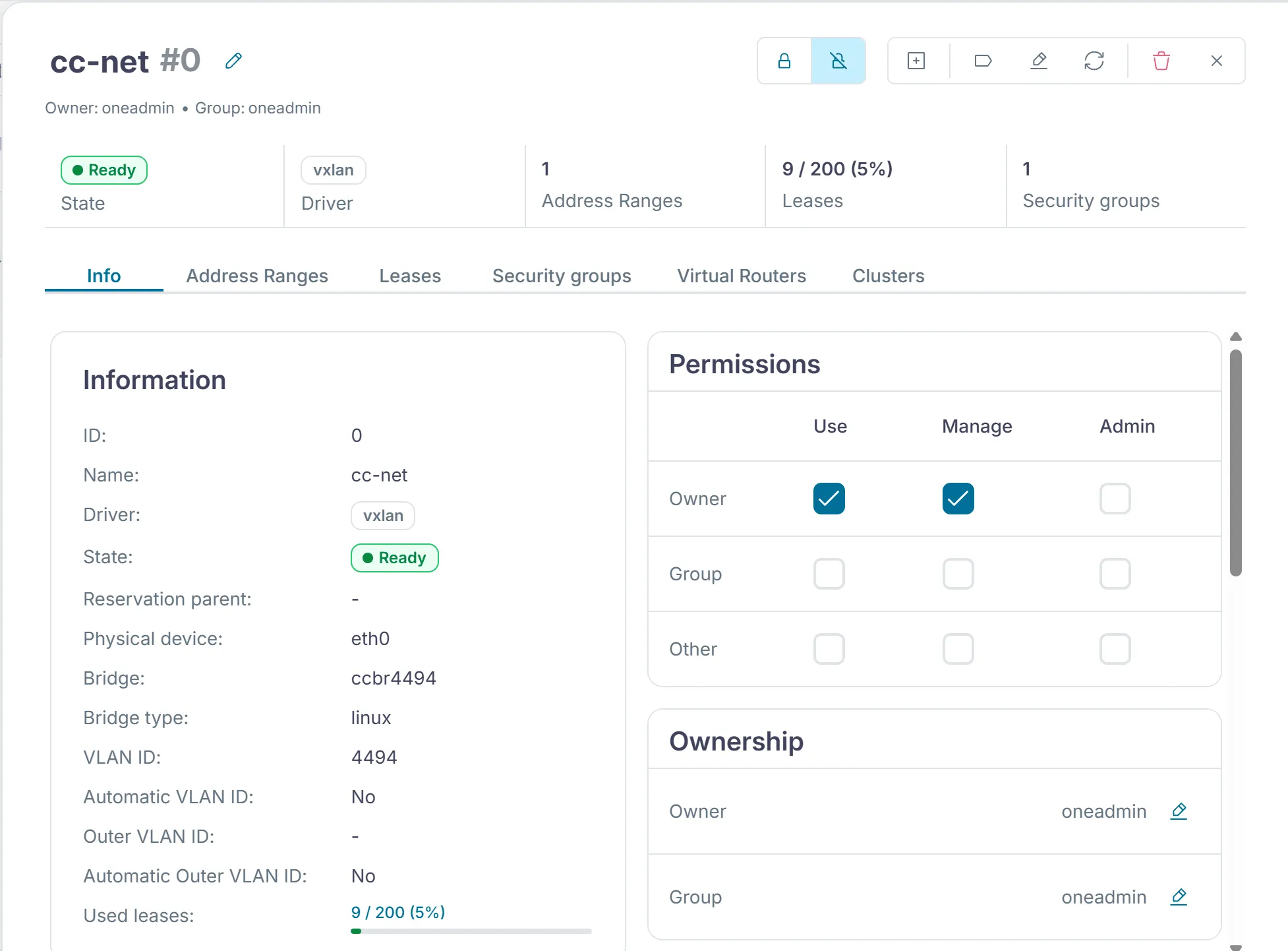
NETWORK_ADDRESS = "${CC_GUEST_NET%/*}"NETWORK_MASK = "255.255.255.0"GATEWAY = "$CC_GUEST_GATEWAY"DNS = "9.9.9.9 1.1.1.1"VN_MAD picks the driver, PHYDEV the interface on the nodes, VLAN_ID the VXLAN identifier and BRIDGE the name of the bridge on the nodes. AR is the address range from which OpenNebula hands out addresses to the VMs. The VMs receive GATEWAY and DNS through the context, as chapter 2.4 shows. The guide to virtual networks of OpenNebula 7.4 explains these attributes and the commands for networks and address ranges.
In Sunstone the network is under "Networks › Virtual networks". Its "Info" tab shows the same values.
Addresses and leases
Section titled “Addresses and leases”OpenNebula hands out the addresses itself, without DHCP. When a VM starts, OpenNebula takes the next free address from the address range and records it as a lease. The VM receives address, gateway and DNS at boot through the context. onevnet show lists the addresses in use.
onevnet show cc-netIn Sunstone the "Leases" tab of the network lists the same addresses.
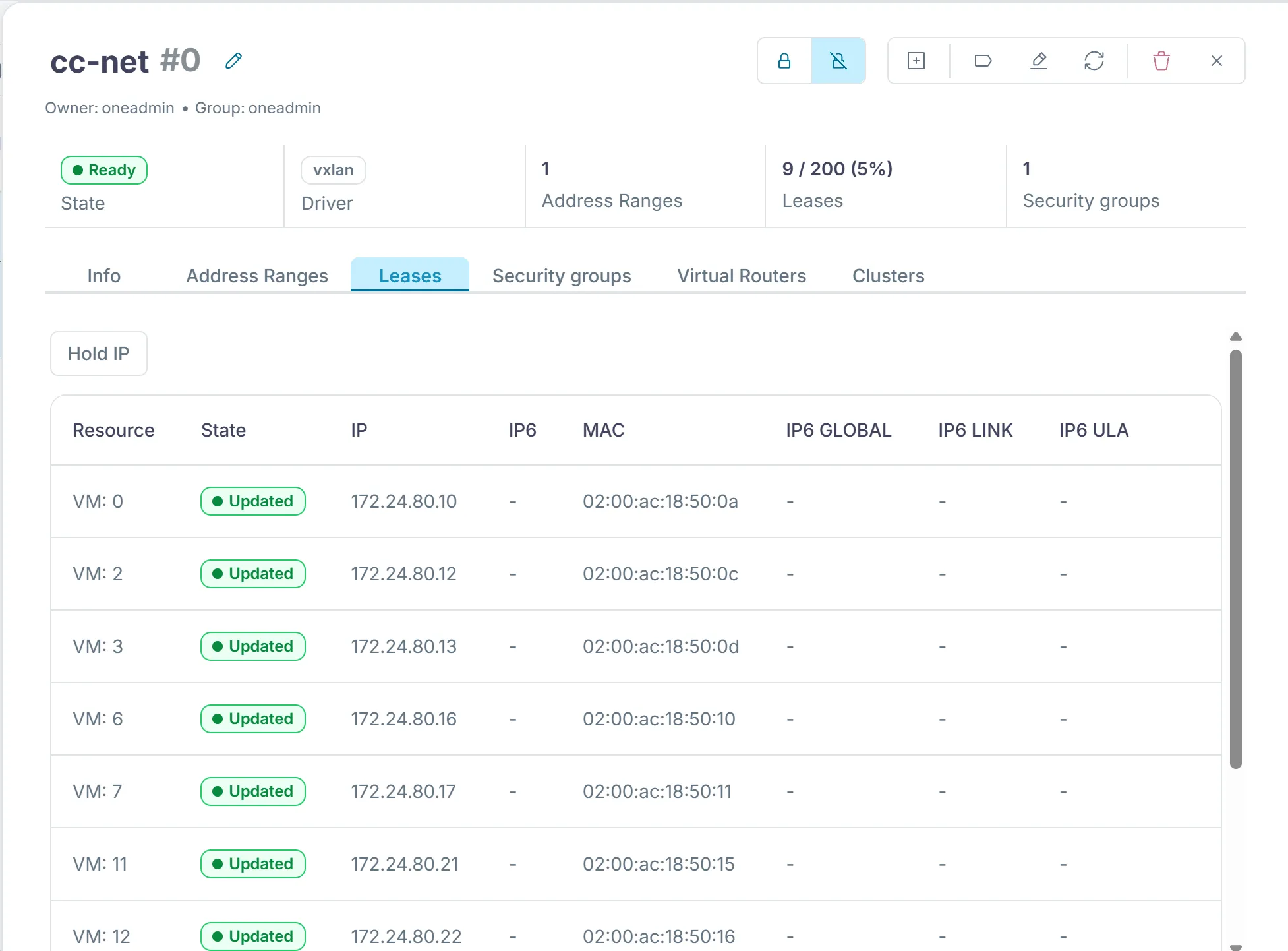
Since OpenNebula manages the addresses, a VM keeps its address for as long as it exists. When you delete it, the lease becomes free again.
Network and gateway
Section titled “Network and gateway”The network cc-net and the service cc-gateway from chapter 0.4 belong together. On the nodes OpenNebula creates the bridge ccbr with your identifier and the VXLAN when the first VM starts. On the front-end cc-gateway has already set up the bridge cc-br with the gateway address and the same VXLAN. Packets from a VM to the internet thus travel through the VXLAN to the front-end, which sends them on to the lab network and the internet with NAT.
Source NAT
Section titled “Source NAT”The addresses of your internal network come from a private range as defined in RFC 1918. Internet routers do not forward such addresses, and the lab network has no route back into your internal network either. If the front-end passed the VMs' packets on unchanged, no reply would ever come back. So it applies source NAT and replaces the source address of every outgoing packet with its own address on the lab network, as RFC 3022 describes. To let many VMs share that one address at the same time, it also changes the source port when needed. The kernel records every connection in a table, the connection tracking table. When a reply arrives, it looks up the matching entry, puts the VM's address back in as the destination and sends the packet back through the VXLAN.
Masquerade is a kind of source NAT where the rule does not contain a fixed new source address. The kernel takes the current address of the interface the packet leaves through, so the rule stays correct even if the front-end's address changes. The rule in cc-gateway only matches packets from your internal network that leave through the interface to the lab network. Before that, the script turns on forwarding with net.ipv4.ip_forward. Without it, a Linux host does not pass on packets meant for other machines.
sysctl -qw net.ipv4.ip_forward=1 nft -f - <<EOFtable ip $TABLE { chain postrouting { type nat hook postrouting priority srcnat; policy accept; ip saddr $CC_GUEST_NET oifname "$dev" masquerade }}EOFThe members' VMs therefore reach the internet, but nobody outside can see them. A connection that starts outside finds no entry in the table and only reaches the front-end itself. To make a service in a VM reachable from outside, you need a port forward with destination NAT or a proxy on the front-end.
Exercise Lab
Create the network cc-net with the script and compare onevnet show cc-net with the values in /etc/cc-lab.env. Which three values have to match for the gateway to work?
Solution
The identifier VLAN_ID has to equal CC_VNI, the gateway GATEWAY has to be CC_GUEST_GATEWAY, and the addresses of the range have to lie within CC_GUEST_NET. Only then do the front-end and the VMs share the same VXLAN, and the NAT rule on the front-end covers the traffic of the VMs.
Exercise Network drivers
Gemeinde Hinterbüel runs its own small data center with a switch that supports VLANs and is thinking about a cloud of its own. Which network driver would you recommend, and why?
Solution
802.1Q fits because the switch provides VLANs. Each network gets its own VLAN, without the extra VXLAN header and without multicast on the network. VXLAN would work too, but it pays off mainly when the network underneath should not or cannot know about the VMs.
Text and figures are licensed under CC BY-SA 4.0 and the code under the MIT License. The sources are on GitHub.