Users, groups and VDCs
Assignment
"Starting next month, all four members want to get going," Simone Wyss writes. "But Praxis Rosenweg must not see anything of the bike shop's web shop, and vice versa. And I don't want a phone call for every new VM."
Learning goals
After this chapter you can:
- Explain what multi-tenancy means in a cloud
- Tell users, groups and group admins in OpenNebula apart
- Create a group with an admin for every member
- Set up a virtual data center (VDC) and justify it
- Read an ACL
Multi-tenancy
Section titled “Multi-tenancy”So far you have worked alone as oneadmin and seen everything. A cloud for several organizations needs multi-tenancy. The tenants share the same hardware but only see their own VMs, images and templates. Each tenant manages its own people, and the platform team decides which resources it may use and how much of them.
OpenNebula builds this from three building blocks.
| Building block | What it decides | In the lab |
|---|---|---|
| Group | who belongs together and shares resources, separate from the other groups | one group per member |
| Group admin | who may create users in a group and manage all VMs of the group | praxis-admin, treuhand-admin and so on |
| VDC | which clusters, hosts, networks and datastores a group may use | the VDC wolkenwerk for all members |
A VDC (virtual data center) is a slice of the infrastructure that OpenNebula assigns to one or more groups. Within it the groups only see their own objects, even though they share the same nodes.
Groups and group admins
Section titled “Groups and group admins”onegroup create creates a group and, if you like, an admin with it. --resources decides which objects the users of the group may create themselves. In the lab these are VMs, images, templates and documents. OneFlow in chapter 3.5 needs the documents because OpenNebula stores a service as a document. The groups documentation describes the options of onegroup create.
The script lab/tenants/make-tenants.sh creates the four members. It generates random passwords for the group admins and stores them in ~/cc-lab/tenants/, where only your user can read them.
#!/bin/bash# Creates the four members of Wolkenwerk Bern as groups with an admin each and a VDC for them,# the steps of chapter 3.1. Run it as your user on the front-end, it may run again.##   ~/cc/lab/tenants/make-tenants.sh## The passwords of the group admins are generated once and kept in ~/cc-lab/tenants/.set -euo pipefail
MEMBERS=(praxis treuhand velo gemeinde)VDC=wolkenwerkPASS_DIR=~/cc-lab/tenantsmkdir -p "$PASS_DIR"chmod 700 "$PASS_DIR"
for member in "${MEMBERS[@]}"; do  if ! onegroup show "$member" >/dev/null 2>&1; then    pass_file="$PASS_DIR/$member-admin.pass"    [ -f "$pass_file" ] || (umask 077 && openssl rand -base64 12 | tr -d '/+=' >"$pass_file")    # Group users may create VMs, images, templates and documents, OneFlow services are documents    onegroup create --name "$member" --admin_user "$member-admin" --admin_password "$(cat "$pass_file")" \      --resources "VM+IMAGE+TEMPLATE+DOCUMENT" >/dev/null    echo "group $member with admin $member-admin created"  fidone
# Every new group lands in the VDC default, which grants all clusters to every group.# The members get their own VDC instead, so the platform team decides what they see.onevdc show "$VDC" >/dev/null 2>&1 || onevdc create "$VDC" >/dev/nullfor member in "${MEMBERS[@]}"; do  gid=$(onegroup show "$member" --json | python3 -c 'import json,sys; print(json.load(sys.stdin)["GROUP"]["ID"])')  onevdc delgroup default "$gid" >/dev/null 2>&1 || true  onevdc addgroup "$VDC" "$gid" >/dev/null 2>&1 || truedone# Zone 0 and cluster 0 hold both nodes, cc-net and the datastores of the labonevdc addcluster "$VDC" 0 0 >/dev/null 2>&1 || true
# The members may use the course template and its image, but not change themonetemplate chmod ubuntu 604oneimage chmod ubuntu-26.04 604
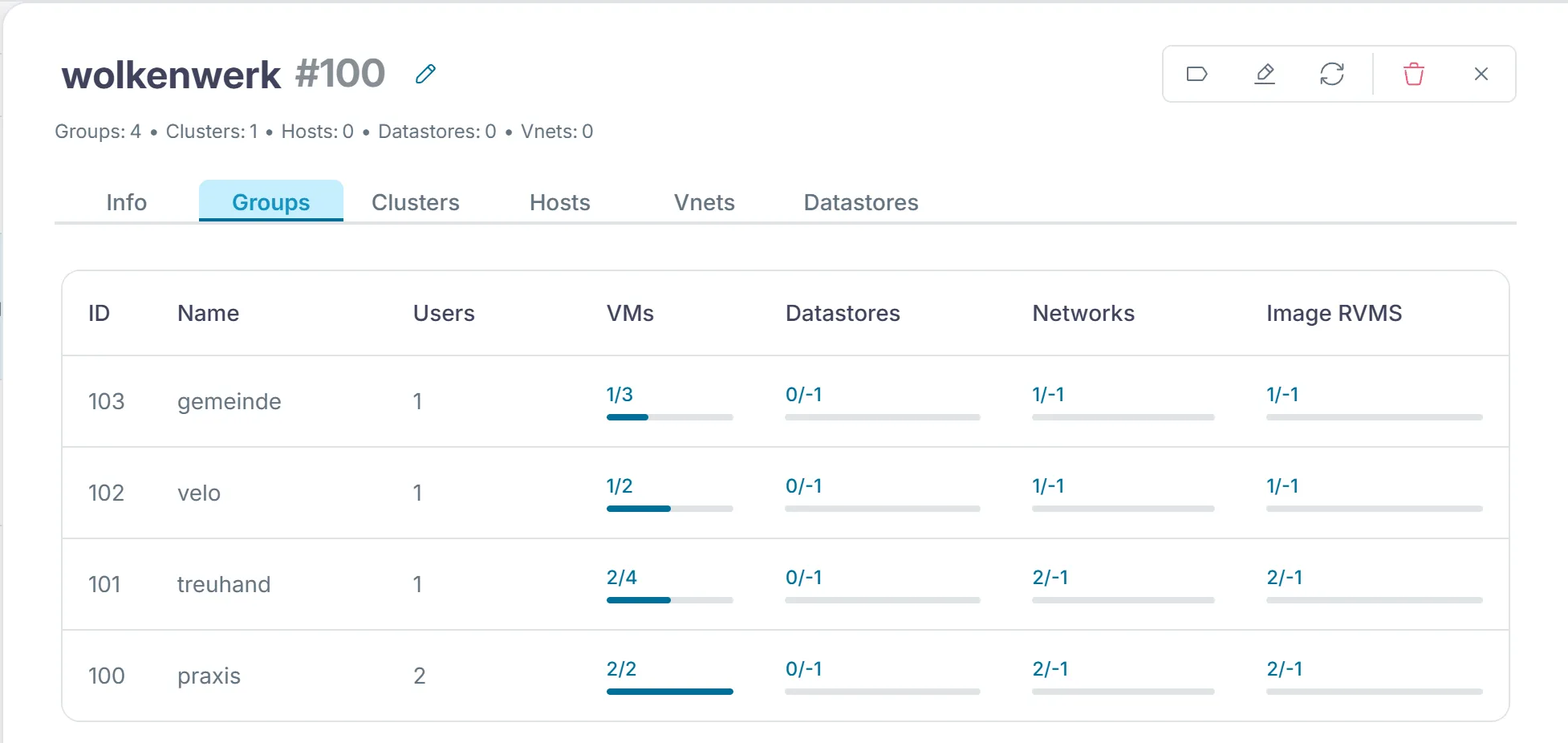
onevdc show "$VDC" | sed -n '/GROUPS/,$p'~/cc/lab/tenants/make-tenants.shonegroup listoneuser listEvery new group first lands in the VDC default, which grants all clusters to all groups. The script takes the members out of it and gathers them in the VDC wolkenwerk. It assigns cluster 0, which holds both nodes, the network cc-net and the datastores, to that VDC. The VDC documentation describes the VDC default and the commands of onevdc. Finally it uses chmod 604 to let everybody use the template ubuntu and its image. The first digit 6 lets the owner use and manage the object, the 0 gives the group oneadmin no extra rights, and the 4 lets everybody else use it.
In Sunstone the VDC is under "System › VDCs", and its "Groups" tab lists the four groups.
Working as a member
Section titled “Working as a member”To see what a member sees, you log in as its admin. The CLI reads user and password from the file that ONE_AUTH points to. The CLI configuration documentation describes this variable. The loop creates such a file for each of the four admins. You will need these files in the next chapters as well.
for m in praxis treuhand velo gemeinde; do printf '%s-admin:%s\n' "$m" "$(cat ~/cc-lab/tenants/$m-admin.pass)" > ~/cc-lab/tenants/$m.authdonechmod 600 ~/cc-lab/tenants/*.authexport ONE_AUTH=~/cc-lab/tenants/praxis.authonetemplate listonevnet listonevm listunset ONE_AUTHThe practice sees the template ubuntu and the network cc-net, but no VMs of oneadmin. For SSH access to its VMs, praxis-admin needs a public key as well, because the context takes the key from the user who starts the VM. As oneadmin you add it the same way as in chapter 2.4.
printf 'SSH_PUBLIC_KEY="%s"\n' "$(cat ~/.ssh/id_ed25519.pub)" > /tmp/key.tploneuser update praxis-admin --append /tmp/key.tplIf the practice now starts a VM, the bike shop does not see it. In the lab, onevm list as velo-admin showed no VM at all while two of the practice's VMs were running.
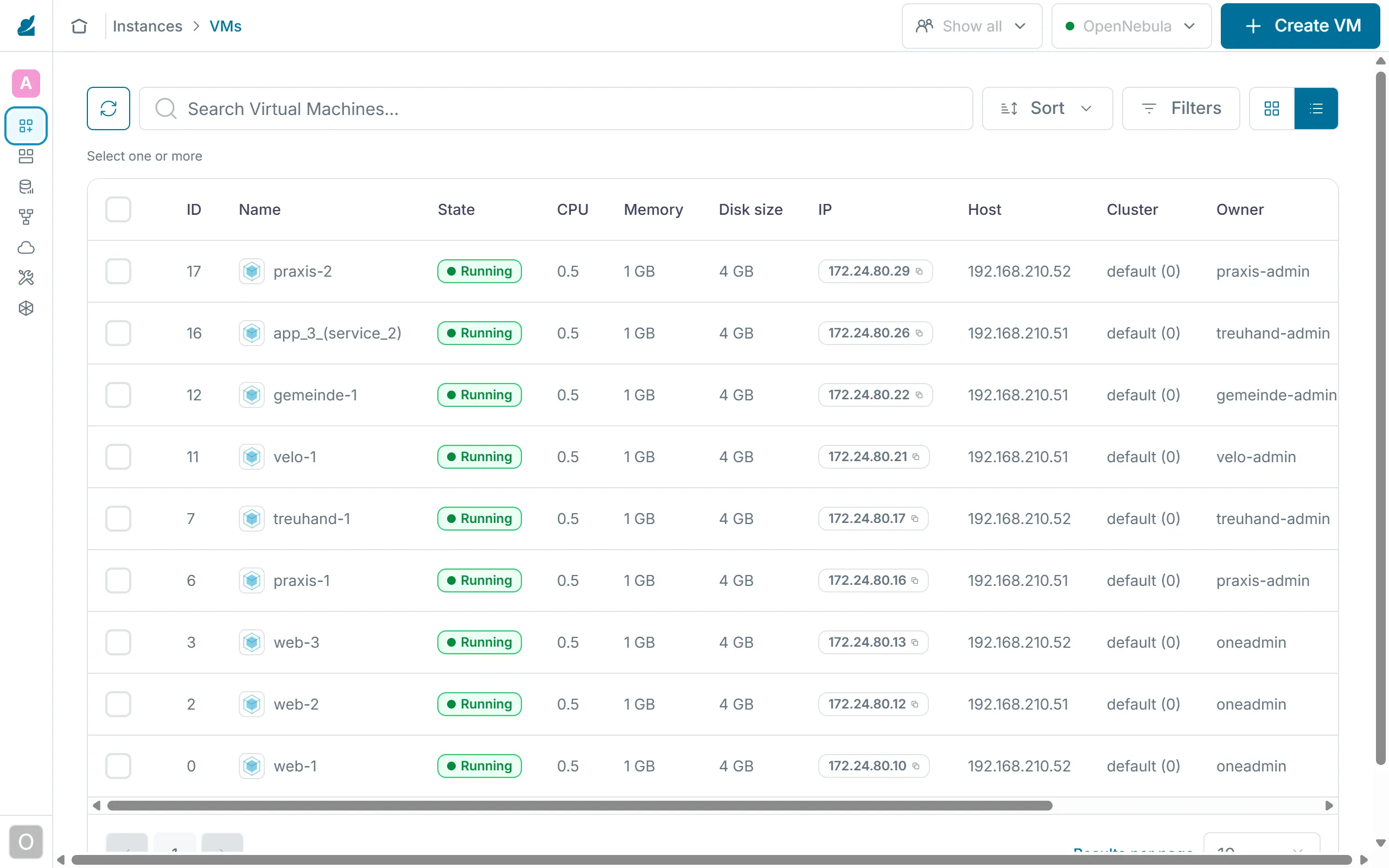
As oneadmin, by contrast, Sunstone shows you the VMs of all members.
Groups and VDCs are built on ACLs (access control lists). Each rule says who may work on which resources with which rights. oneacl list shows the rules as a table of letters, and oneacl create adds a new one. The ACL documentation explains how a rule is built.
@100 VM+IMAGE+TEMPLATE+DOCUMENT/* CREATE@100 is the group with the number 100, VM+IMAGE+TEMPLATE+DOCUMENT are the resources, /* means all objects of that kind, and CREATE is the right. onegroup create made this rule from the --resources option. In oneacl list the same rule reads V--I-T---O--------- with the operation ---c. If you forgot a resource, you add it with a rule of your own and do not have to create the group again.
Exercise Lab
Create the four members, log in as praxis-admin and start the VM praxis-1 from the template ubuntu. Show as velo-admin that the bike shop does not see this VM.
Solution
After make-tenants.sh, onegroup list shows the groups praxis, treuhand, velo and gemeinde. As praxis-admin, onetemplate instantiate ubuntu --name praxis-1 starts the VM, and onevm list shows it with the owner praxis-admin and the group praxis. With the auth file of velo-admin, onevm list stays empty.
Exercise Group or VDC
Gemeinde Hinterbüel plans to buy a node of its own later, for its use only. Is a separate group enough for that, or does it need its own VDC? Explain.
Solution
A group only separates the objects. The municipality's VMs could still run on any node. Only a VDC of its own that has just the new node assigned makes sure they run there and nowhere else. So it needs both, the group for the objects and the VDC for the infrastructure.
Text and figures are licensed under CC BY-SA 4.0 and the code under the MIT License. The sources are on GitHub.