Backup and restore
Assignment
"The new organization is asking what happens in an outage," writes Simone Wyss. "How long are we down, and how much data do we lose? And please try it out once instead of just claiming it."
Learning goals
After this chapter you can:
- Set and justify an RPO and an RTO for a service
- Tell apart what Git covers and what needs a backup
- Run the cluster with etcd and regular snapshots
- Back up and restore VMs in OpenNebula
- Practice a restore and measure the time
RPO and RTO
Section titled “RPO and RTO”Two numbers describe what an outage may cost. The recovery point objective (RPO) is the point in time to which data must be recovered after an outage. If you back up every night, you can lose up to 24 hours of data. The recovery time objective (RTO) is the longest time a service may be down before the damage is no longer acceptable. Both terms come from contingency planning, and NIST defines them in SP 800-34.
A small RPO calls for frequent backups, a small RTO for a fast restore that has been practiced. Both cost money. The fiduciary office would hate to lose half a day of bookings at the end of the month, while the web shop can easily get by without a day of logs.
A common rule of thumb is the 3-2-1 rule, which the US agency CISA describes in Data Backup Options. You keep three copies of important data on two different media, one of them offsite.
The limits of Git
Section titled “The limits of Git”Since part 4, the desired state of the platform has been in Git. A new cluster gets all applications, templates and rules from there. Much else is not in Git, though.
| What | Where | Backed up by |
|---|---|---|
| manifests, charts, rules, SealedSecrets | repo platform in Gitea | Git, with a copy on the front-end in ~/platform |
| OpenTofu state | ~/platform/tofu/terraform.tfstate | not in Git, holds the k3s token |
| cluster state, such as secrets and the Argo CD password | etcd on the server | k3s snapshots |
| k3s token, Sealed Secrets key | server and cluster | backup-k3s.sh |
| data in volumes, such as Prometheus, Loki, audit log | agent disk | not in this course |
| member VMs | node datastores | OpenNebula backups |
The Gitea repo lives on the front-end, like the state, the snapshots and the backups. If the front-end fails, all four are gone at once. That violates the 3-2-1 rule. One copy belongs on another system, such as your instructor's computer or storage offsite.
The cluster with etcd
Section titled “The cluster with etcd”In part 4 you installed k3s with its default database, SQLite. For snapshots, k3s needs etcd. The template from the additions of part 6 starts the server with --cluster-init and lets k3s write a snapshot every six hours, keeping eight of them on the server. The k3s documentation describes the options.
#!/bin/sh# Runs at every boot through the OpenNebula context, k3s installs only oncecommand -v k3s >/dev/null 2>&1 && exit 0
# Pods and services get their own ranges, the defaults 10.42.0.0/16 and 10.43.0.0/16 can overlap a lab network.# host-gw routes pod traffic directly, both VMs share cc-net and VXLAN inside VXLAN loses packets in nested VMs.# --cluster-init keeps the cluster state in etcd instead of SQLite, k3s then takes a snapshot every six hours and keeps eight%{ if role == "server" ~}curl -sfL https://get.k3s.io | INSTALL_K3S_VERSION="${k3s_version}" K3S_TOKEN="${token}" sh -s - server \  --tls-san ${ip} \  --cluster-init \  --etcd-snapshot-schedule-cron "0 */6 * * *" \  --etcd-snapshot-retention 8 \  --cluster-cidr 10.52.0.0/16 \  --service-cidr 10.53.0.0/16 \  --flannel-backend host-gw%{ else ~}until curl -ksf https://${server_ip}:6443/ping >/dev/null; do sleep 5; donecurl -sfL https://get.k3s.io | INSTALL_K3S_VERSION="${k3s_version}" K3S_URL="https://${server_ip}:6443" K3S_TOKEN="${token}" sh -s - agent%{ endif ~}
The file came into your repo with the copy in chapter 6.1. tofu plan only shows a change to the context of the two VMs. The start script runs at every boot, but it stops right away when k3s is already installed. A changed installation therefore only affects new VMs. So you rebuild the cluster. The option -replace replaces both VMs. It is one of the planning options of tofu plan, which tofu apply accepts as well. That is also the first restore drill, because the rebuild shows how much Git alone brings back.
mkdir -p ~/backup/k3s && chmod 700 ~/backup ~/backup/k3s(umask 077; kubectl -n kube-system get secret -l sealedsecrets.bitnami.com/sealed-secrets-key -o yaml > ~/backup/k3s/sealed-secrets-key.yaml)cd ~/platform/tofuexport OPENNEBULA_USERNAME=oneadminexport OPENNEBULA_PASSWORD=$(cut -d: -f2- ~/.one/one_auth)tofu apply -replace='opennebula_virtual_machine.k3s["k3s-server"]' -replace='opennebula_virtual_machine.k3s["k3s-agent"]'Then follow the steps of chapters 4.3 and 4.4, applying the key before Argo CD as the Sealed Secrets documentation describes for a restore.
source /etc/cc-lab.envssh-keygen -R $CC_K3S_SERVER_IP; ssh-keygen -R $CC_K3S_AGENT_IP~/cc/platform/get-kubeconfig.shkubectl apply -f ~/backup/k3s/sealed-secrets-key.yaml~/cc/platform/bootstrap-argocd.shIn the lab, with the whole stack of part 5, tofu apply took just under three minutes for this rebuild. For 104 seconds of it the old VMs were waiting to shut down. OpenNebula also held one of the new VMs in pending and reported "Not enough capacity on datastores", because it still had the old value for one node's free disk space. onevm show <id> | grep SCHED_MESSAGE shows the reason, and after onehost forceupdate the VM ran half a minute later. The script writes the new Argo CD password to ~/cc-lab/argocd-admin.pass instead of the terminal, so it does not end up in a screenshot. After the bootstrap, Argo CD rolled out everything. The web shop answered 50 seconds later, and after a good minute and a half all applications were synced and healthy, with the Grafana password decrypted again. From the start of tofu apply, a little over five minutes had passed. What was lost was the data in the volumes, meaning the metrics and the logs. The course lab also ran Ollama and a triage service from the advanced tasks of milestone 3. Ollama reloaded its model, and the triage service's audit log was gone.
Saving the snapshots
Section titled “Saving the snapshots”A snapshot on the server does not help if the server itself is lost. The script copies the snapshots to the front-end, along with the k3s token and the Sealed Secrets key.
#!/bin/bash# Copies the etcd snapshots and the token of the k3s server and the key of Sealed Secrets to the front-end, chapter 6.2.# A snapshot alone is not enough for a restore, k3s also needs the token of the old server.# Without the key a new cluster cannot decrypt the SealedSecrets in Git.##   ~/cc/platform/operations/backup-k3s.sh## A systemd timer runs it every six hours, see install-backup-timer.sh.set -euo pipefail
# shellcheck source=/dev/nullsource /etc/cc-lab.envdest=~/backup/k3smkdir -p "$dest/snapshots"chmod 0700 ~/backup "$dest"kubectl -n kube-system get secret -l sealedsecrets.bitnami.com/sealed-secrets-key -o yaml > "$dest/sealed-secrets-key.yaml"chmod 0600 "$dest/sealed-secrets-key.yaml"# Right after a rebuild the server has no snapshot yet, token and key are still worth copyingif ssh "root@$CC_K3S_SERVER_IP" 'ls /var/lib/rancher/k3s/server/db/snapshots/* >/dev/null 2>&1'; then  scp -q -p "root@$CC_K3S_SERVER_IP:/var/lib/rancher/k3s/server/db/snapshots/*" "$dest/snapshots/"fiscp -q -p "root@$CC_K3S_SERVER_IP:/var/lib/rancher/k3s/server/token" "$dest/token"chmod 0600 "$dest/token"# k3s keeps eight snapshots on the server, the front-end keeps the last seven daysfind "$dest/snapshots" -type f -mtime +7 -deleteecho "$(date -Is) $(find "$dest/snapshots" -type f | wc -l) snapshots in $dest"
Ubuntu 26.04 comes without cron. A systemd timer starts the script every six hours, half an hour after the k3s snapshots. The systemd.timer manual page describes the settings of a timer.
Right after the rebuild, k3s has no snapshot yet. The first one only comes at the next full six-hour mark, so take one by hand before the first copy.
source /etc/cc-lab.envssh root@$CC_K3S_SERVER_IP k3s etcd-snapshot savesudo ~/cc/platform/operations/install-backup-timer.shsudo systemctl start cc-backup-k3s.servicels ~/backup/k3s/snapshotsThat makes the RPO of the cluster six hours. Anything changed in that time through kubectl instead of Git would be gone after a restore. Restoring from a snapshot is part of advanced task B in chapter 6.5.
VMs in OpenNebula
Section titled “VMs in OpenNebula”OpenNebula backs up the member VMs itself. Backups go to a datastore of type BACKUP_DS. The Community Edition has the drivers rsync and restic, and the OpenNebula documentation describes both. The course uses rsync, which copies the disks over SSH to the front-end.
#!/bin/bash# Creates the backup datastore of OpenNebula on the front-end, chapter 6.2.# The driver rsync copies the disks of a VM over SSH to the front-end.##   ~/cc/platform/operations/backup-datastore.shset -euo pipefail
# shellcheck source=/dev/nullsource /etc/cc-lab.envif ! onedatastore show backups >/dev/null 2>&1; then  tmpl=$(mktemp)  cat > "$tmpl" <<TMPLNAME       = "backups"TYPE       = "BACKUP_DS"DS_MAD     = "rsync"TM_MAD     = "-"RSYNC_USER = "oneadmin"RSYNC_HOST = "$CC_FE_IP"TMPL  onedatastore create "$tmpl"  rm -f "$tmpl"fionedatastore show backups | grep -E '^(ID|NAME|STATE)'
Since chapter 4.2 only the two k3s VMs run in OpenNebula. You do not back them up this way, since their state lives in Git and in the etcd snapshots. To practice, start the VM praxis-1 from the template ubuntu with 1 GB as praxis-admin. A node has no more memory to spare next to k3s. You back up this VM and restore it. So that you can check the restore, create a test file before the backup. onevm show shows the address of the VM. If you do advanced task A from chapter 6.5, you can use the VM of your own member instead.
onevm backup starts a backup by hand, even for a running VM. In the lab, backing up a VM with 1 GB of memory and Ubuntu 26.04 took six to eleven seconds, and the backup image was 1004 MB.
ONE_AUTH=~/cc-lab/tenants/praxis.auth onetemplate instantiate ubuntu --name praxis-1ssh root@<address-of-the-vm> 'echo before the backup > /root/testfile.txt && sync'~/cc/platform/operations/backup-datastore.shonevm backup -d backups <vm>oneimage listFor a running VM, the backup only holds what is already on its disk. Ubuntu writes changes on the root partition to disk after up to 30 seconds, and sync forces it at once. Without sync, the test file was missing after the restore in the lab, because the backup had run seven seconds after the file was created. A database inside the VM also keeps data in memory, so its backup is only as complete as after a power cut. OpenNebula does not freeze the file system before the backup, which onebackupjob show lists as the setting FS_FREEZE="NONE".
A backup job, as the OpenNebula 7.4 documentation describes it, takes care of regular backups. The script creates one that backs up every night. Without further arguments it runs at 2 a.m. and keeps seven backups. You can pass the hour and the number, for milestone 4 the ones from your personal values. The hour is in the time zone of the front-end, which timedatectl shows.
~/cc/platform/operations/backup-job.sh praxis-nightly <vm> <hour> <number>onebackupjob list#!/bin/bash# Creates a backup job in OpenNebula that backs up VMs every night, by default at 2.00 and keeping seven backups, chapter 6.2.## ~/cc/platform/operations/backup-job.sh <name> <VM IDs separated by commas> [hour] [backups to keep]# ~/cc/platform/operations/backup-job.sh velo-nightly 21,22# ~/cc/platform/operations/backup-job.sh praxis-nightly 15 4 10## The hour is in the time zone of the front-end, timedatectl shows it.set -euo pipefail
name=${1:?name of the job}vms=${2:?VM IDs, for example 21,22}hour=${3:-2}keep=${4:-7}# The first run is tonight if the hour is still ahead, otherwise the next nightfirst=$(date -d "today $hour:00" +%s)[ "$first" -gt "$(date +%s)" ] || first=$(date -d "tomorrow $hour:00" +%s)ds=$(onedatastore show backups --json | python3 -c 'import json, sys; print(json.load(sys.stdin)["DATASTORE"]["ID"])')tmpl=$(mktemp)# REPEAT 0 means weekly, on the days 0 to 6, so every day. TIME is the first run in seconds since 1970cat > "$tmpl" <<TMPLNAME = "$name"BACKUP_VMS = "$vms"DATASTORE_ID = "$ds"KEEP_LAST = "$keep"MODE = "FULL"SCHED_ACTION = [ REPEAT = "0", DAYS = "0,1,2,3,4,5,6", END_TYPE = "0", TIME = "$first" ]TMPLonebackupjob create "$tmpl"rm -f "$tmpl"onebackupjob show "$name" | sed -n '/SCHEDULED ACTIONS/,/^$/p'Sunstone shows the job under "Storage › BackupJobs". The "Info" tab lists the last run and the values of the job.
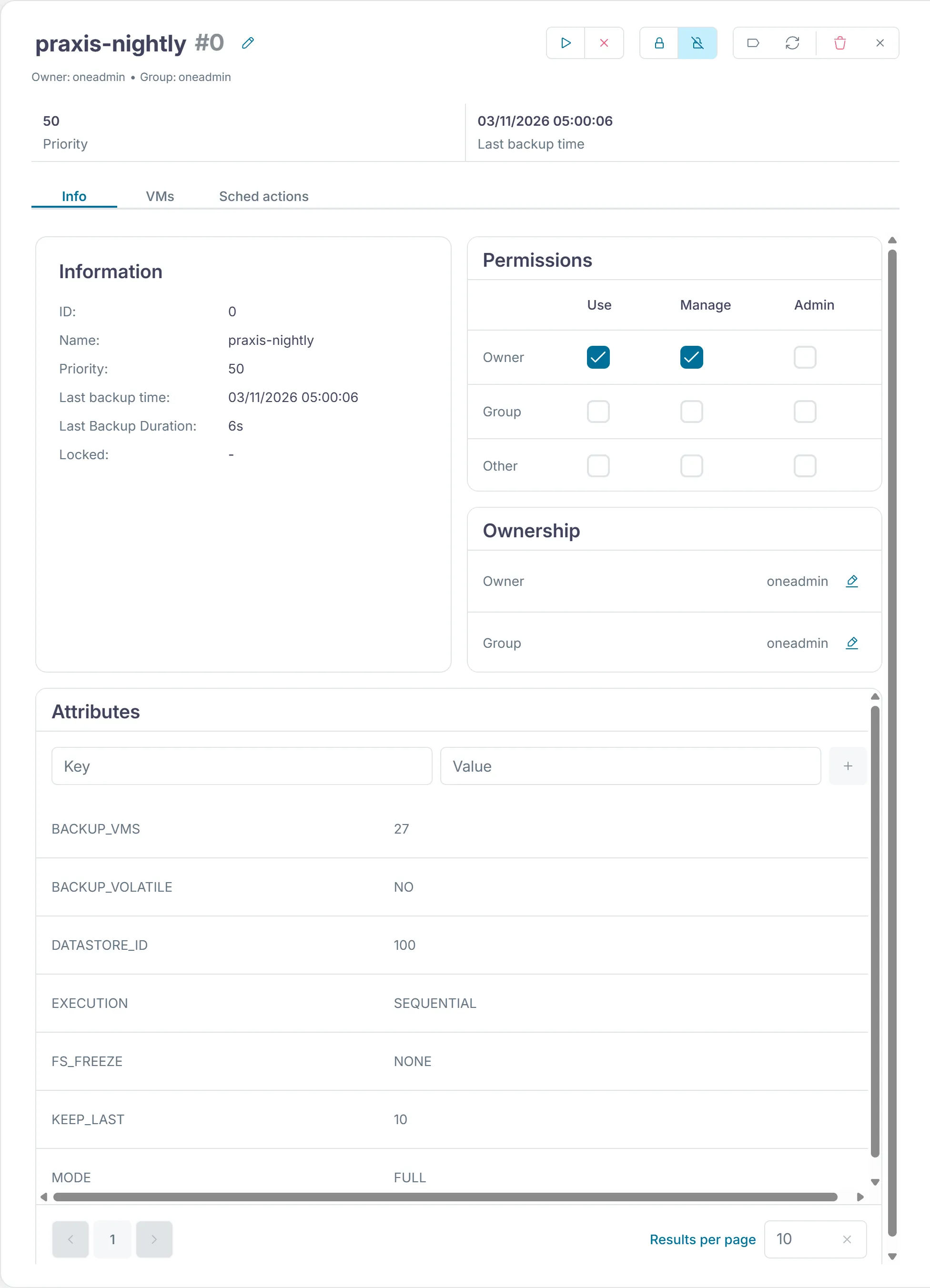
Once a VM belongs to a backup job, onevm backup refuses it. An extra backup then comes from onebackupjob backup praxis-nightly, which backs up all VMs of the job.
To restore, oneimage restore turns a backup into a new template with a new image. The OpenNebula documentation calls this a full restore. In the lab, 20 seconds to a minute after the command, the new VM held the test file from before the backup again. Template, image and VM then belong to oneadmin, and onevm chown gives the VM back to the member. The new VM has a new number. So that the backup job keeps backing it up, you enter it in the job.
onevm terminate --hard <vm>oneimage restore -d default <backup-image>onetemplate instantiate <new-template> --name <name>onevm chown <new-vm> <user> <group>echo 'BACKUP_VMS="<new-vm>"' > /tmp/job.tplonebackupjob update praxis-nightly /tmp/job.tpl --appendThe new VM gets its first backup of its own the next night. If you do not want to wait that long, onebackupjob backup praxis-nightly takes it right away.
Sunstone lists the backups under "Storage › Backups".
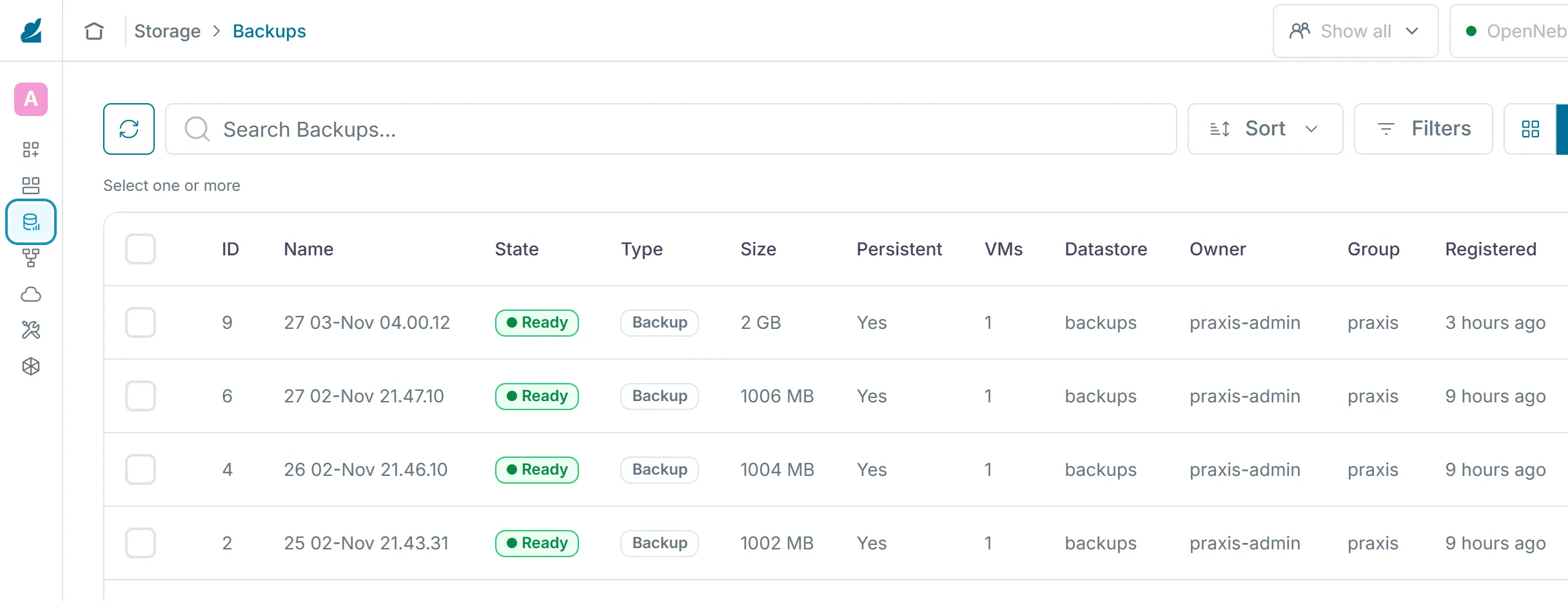
Backups count against the datastore quota. A member with many large backups needs space there, and that space costs money. Chapter 6.4 comes back to it.
Outlook
Section titled “Outlook”Velero backs up namespaces together with their volumes into object storage and restores single namespaces without resetting the whole cluster. It would need storage such as MinIO and more components on the tight nodes. For the course, Git, the etcd snapshots and the OpenNebula backups are enough.
The check of part 6
Section titled “The check of part 6”From chapter 6.1, the check of this part tests the hardened front-end, meaning SSH with keys only, the firewall and the automatic updates. For the first test it tries to log in to the front-end without a key itself. It adds the applications sealed-secrets and secrets, the Grafana password from the SealedSecret and the restricted profile in every member namespace. From this chapter it tests the etcd snapshots, their copy with the token and the key on the front-end, the timer, the backup datastore, a backup job with a schedule and a backup of a VM. Run it on the front-end once the backup job is in place.
python3 ~/cc/checks/check.py operationsThe four lines about the new member marked [+!!] belong to advanced task A in chapter 6.5 and do not count for the base.
Exercise RPO and RTO
Set an RPO and an RTO for the four members. Check whether the platform meets them with snapshots every six hours and nightly backups. If you do the advanced tasks from chapter 6.5, add your own member.
Solution
One possible setting is the fiduciary office with an RPO of four hours and an RTO of four hours at the end of the month, the practice with an RPO of 24 hours and an RTO of one working day, the web shop with an RPO of 24 hours and an RTO of one hour on Saturdays, the municipality with an RPO of 24 hours and an RTO of four hours during counter hours. The nightly VM backups reach an RPO of 24 hours, so the fiduciary office would need more frequent ones. An RTO of one hour requires a practiced restore. In the lab, rebuilding the cluster took a little over five minutes, restoring from the snapshot less than one.
Exercise Lab
Rebuild the cluster with etcd, set up the snapshot copies and a backup job, and restore the VM praxis-1 from its backup. Measure the times. Finally run the check operations and add its report to your hand-in repo.
Solution
On the server, k3s etcd-snapshot ls shows the snapshots. ~/backup/k3s holds snapshots, token and key, and systemctl list-timers cc-backup-k3s.timer shows the timer's next run. onebackupjob list shows the job, and oneimage list an image of type BK. Afterwards the VM is back and holds the test file. The times are in the range of the lab, a little over five minutes for the rebuild and under a minute for the VM. The check ends with "14 of 14 base checks passed" and "0 of 4 checks of the advanced tasks passed".
Exercise Three copies
All backups are on the front-end. Describe what a loss of the front-end would take with it, and propose a way to the 3-2-1 rule that fits the budget of a small cooperative.
Solution
With the front-end, Gitea, the OpenTofu state, the snapshots, the VM backups and the OpenNebula database would be gone at once. The VMs on the nodes would keep running but could no longer be managed. An affordable way is an encrypted copy of the backup datastore and the folders ~/backup and ~/platform every night to storage offsite. That can be a disk at a second location or object storage in Switzerland. The key for it does not belong on the same storage.
Text and figures are licensed under CC BY-SA 4.0 and the code under the MIT License. The sources are on GitHub.