Autoscaling
Assignment
"Things kick off at ten on Saturdays," Veloatelier Matte writes. "During the week the shop gets by with little. On Saturday it should grow without one of you sitting next to it."
Learning goals
After this chapter you can:
- Explain how the HorizontalPodAutoscaler calculates the number of pods
- Tune requests, limits and quotas for a deployment with autoscaling
- Run a load test and watch growing and shrinking
- Recognize when more pods no longer help
- Compare autoscaling in Kubernetes with OneFlow elasticity
The HorizontalPodAutoscaler
Section titled “The HorizontalPodAutoscaler”The HorizontalPodAutoscaler (HPA) adjusts the number of pods of a deployment to a metric, usually CPU. It compares the average utilization of the pods with a target, measured as a percentage of their CPU request. The Kubernetes 1.36 documentation gives the calculation.
desired pods = ceil(current pods × current utilization / target)Two pods at 120% with a target of 60% make four pods. The HPA takes the values from the metrics-server that k3s ships.
# Two to six pods, a new pod when the pods use more than 60 % of their CPU request on averageapiVersion: autoscaling/v2kind: HorizontalPodAutoscalermetadata: name: webshopspec: scaleTargetRef: apiVersion: apps/v1 kind: Deployment name: webshop minReplicas: 2 maxReplicas: 6 metrics: - type: Resource resource: name: cpu target: type: Utilization averageUtilization: 60 behavior: # Shrink only after five calm minutes, so that the shop does not shrink between two waves of load scaleDown: stabilizationWindowSeconds: 300The web shop runs with two to six pods. When shrinking, the HPA waits five minutes and takes the highest recommendation of that period. If the shop is briefly quiet between two waves, it does not lose its pods right away. In milestone 3 you set maxReplicas in webshop/hpa.yaml through Git to the maximum from your personal values.
Two controllers for one number
Section titled “Two controllers for one number”So far, the number of pods was in Git, the number from chapter 4.4. With the HPA there would be two controllers for the same number. The HPA would raise it to six and Argo CD with self-heal would reset it to three, again and again. The deployment in observability/repo/webshop therefore has no replicas anymore. If the field is missing in Git, Argo CD leaves it alone, and the HPA sets the number by itself. During the switch the deployment dropped to one pod for about 15 seconds in the lab until the HPA raised it back to its minimum.
apiVersion: apps/v1kind: Deploymentmetadata: name: webshop labels: app: webshopspec: # No replicas here, the HorizontalPodAutoscaler sets them. A value in Git would fight with it selector: matchLabels: app: webshop template: metadata: labels: app: webshop spec: securityContext: runAsNonRoot: true containers: - name: webshop image: ghcr.io/ndum/cc/webshop:1.0.0 imagePullPolicy: IfNotPresent ports: - name: http containerPort: 8080 env: - name: SHOP_NAME value: Veloatelier Matte # Work per request in milliseconds, makes the load test visible in the CPU - name: WORK_MS value: "20" # Share of requests answered with an error, raise it to break the SLO on purpose - name: FAIL_PERCENT value: "0" resources: requests: cpu: 50m memory: 64Mi # 6 pods with 250m stay below the quota of 2 CPU with room for the pods of a rollout limits: cpu: 250m memory: 128Mi readinessProbe: httpGet: path: /healthz port: http timeoutSeconds: 3 livenessProbe: httpGet: path: /healthz port: http # A busy pod may need longer than the default second, a failed liveness check restarts it timeoutSeconds: 3WORK_MS makes the shop compute for 20 milliseconds per request so that the load shows up in the CPU. The request of 50m is the basis of the HPA percentages, the limit of 250m the ceiling of a pod.
The load test
Section titled “The load test”The web shop image contains a load generator, load.py. It sends requests with several threads as fast as the shop answers and prints throughput, errors and response time every ten seconds. You start it as a pod in the namespace default and send the load through Traefik, the same way customers come in.
kubectl run load --restart=Never --image=ghcr.io/ndum/cc/webshop:1.0.0 -- \ python3 /app/load.py http://<server-address>/ --workers 20 --seconds 240kubectl -n velo get hpa webshop --watchkubectl logs load--watch keeps running until you stop it with Ctrl+C. You see the output of the generator afterwards with kubectl logs load, or you open a second terminal for it. The finished pod load stays in place. Delete it with kubectl delete pod load before another run, otherwise kubectl run reports that it already exists.
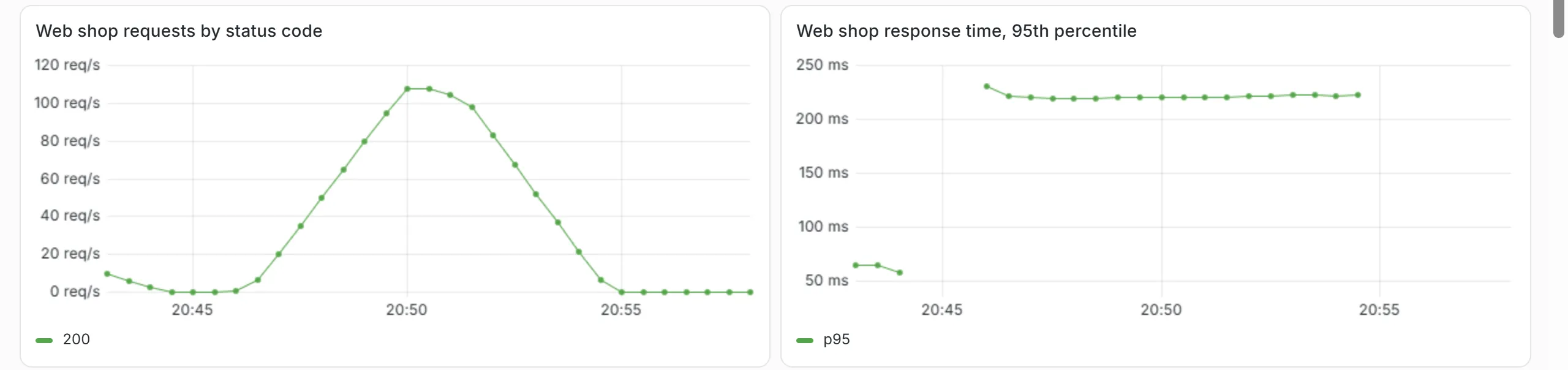
In the lab, the HPA showed more than 400% after almost 30 seconds and asked for six pods. A little over 40 seconds after the start, six pods ran at 500% of their request each, which is the limit of 250m. With two pods the generator reported almost 60 requests per second, 95% of them back within 1.3 s. With six pods it was about 145 requests per second within just under 300 ms. After the load ended, the shop first stayed at six pods because of the five-minute wait. A little over five minutes after the end it shrank to four pods, and 15 seconds later to two. Every surplus pod had stopped after two seconds, because the web shop keeps answering for two seconds after the signal to stop and then exits.
In the dashboard of chapter 5.1 the load test looks like this.
Limits
Section titled “Limits”The lab revealed three limits that occur in production as well.
The quota
Section titled “The quota”In a first attempt, each pod had a limit of 500m. The bike shop's quota allows 2 CPUs of limits. The HPA wanted six pods, four ran, and the fifth failed with this message.
Error creating: pods "webshop-68674cff94-7ln2v" is forbidden: exceeded quota: member, requested: limits.cpu=500m, used: limits.cpu=2, limited: limits.cpu=2The quota of chapter 4.5 protects the other members, but it also limits growth. Whoever sets maxReplicas checks whether maxReplicas × limit fits into the quota.
The rollout
Section titled “The rollout”With six pods at the edge of the quota, someone changed a variable of the deployment. During a rollout, Kubernetes starts extra pods before it has ended all old ones, by default up to 25% more. There was no room in the quota for these pods, and the rollout got stuck with two new and three old pods. A quota therefore needs headroom for the extra pods of a rollout. With 250m, six pods plus two extra pods fit into 2 CPUs.
The bottleneck elsewhere
Section titled “The bottleneck elsewhere”When the quota was raised in the first attempt, six pods ran instead of four, but throughput only went from 175 to 185 requests per second. The load generator is a single Python process and cannot do more. More pods only help if the shop is the bottleneck. Before scaling, find out where the time is lost.
Comparison with OneFlow
Section titled “Comparison with OneFlow”| OneFlow, chapter 3.5 | HPA | |
|---|---|---|
| Unit | VM | pod |
| Starting a new unit | minutes | seconds |
| Measurement | CPU from OpenNebula monitoring | CPU from the metrics-server |
| Growth in the lab | after about 155 seconds | after about 40 seconds |
| Limit | max_vms and the group quota | maxReplicas and the ResourceQuota |
| Schedule | scheduled_policies with cron | not in the HPA, for example a CronJob that changes minReplicas |
Containers start faster than VMs, so the HPA reacts sooner than OneFlow. In both systems a rule measures, compares with a target and changes the number within fixed limits. Both run on the same hardware. Six pods only help if the two cluster VMs have enough CPU.
The check of part 5
Section titled “The check of part 5”The check of this part tests the OpenNebula and libvirt exporters and the applications monitoring, monitoring-config, loki and alloy in Argo CD. It also tests the jobs opennebula, opennebula-libvirt and webshop in Prometheus, the SLO rules, Alertmanager with its configuration, the bike shop's logs in Loki and the web shop's HPA. For the query to Loki it reads the Grafana password from ~/cc-lab/grafana.pass. Run it on the front-end once Prometheus shows all targets as up.
python3 ~/cc/checks/check.py observabilityThe line about a receiver of your own in Alertmanager marked [+!!] belongs to advanced task B in chapter 5.5 and does not count for the base.
Exercise Lab
Check with kubectl -n velo get hpa webshop that the HPA is running. It came into your repo with the additions of chapter 5.1. Run the load test and note when the shop grows and when it shrinks. Show in the dashboard of chapter 5.1 how traffic and response time behave. Finally run the check observability and add its report to your hand-in repo.
Solution
kubectl -n velo get hpa webshop --watch shows the utilization rising and the pods growing from two to six, within a minute in the lab. In the dashboard, requests per second go up and so does the response time, which stayed below the 0.5 s limit of chapter 5.3 in the lab. After the end, the shop stays at six pods for five minutes and then drops to two. The check ends with "15 of 15 base checks passed" and "0 of 1 checks of the advanced tasks passed".
Exercise Quota and HPA
The bike shop wants up to ten pods on Saturdays. What do you have to change in the repo, and what do you check before accepting the pull request?
Solution
maxReplicas: 10 in webshop/hpa.yaml and a higher quota for limits.cpu in members/velo. Ten pods at 250m need 2.5 CPUs, closer to 3 with headroom for the rollout. Before accepting, you check whether the two VMs can carry the requests and whether the sum of all members' quotas is still reasonable, as in chapter 4.5.
Exercise Saturday at ten
The bike shop knows that the load starts at ten on Saturdays. How do you prepare the shop so that it doesn't wait for the first wave to grow?
Solution
A CronJob that sets the HPA's minReplicas to four at 9:45 on Saturdays and back in the evening works like the scheduled rule in OneFlow. Since the repo is the source, the change either goes to Git as a planned commit, or minReplicas is excluded from the comparison with Git in Argo CD. Otherwise self-heal resets the value at once.
Text and figures are licensed under CC BY-SA 4.0 and the code under the MIT License. The sources are on GitHub.