Quotas
Assignment
"Gemeinde Hinterbüel has a fixed budget," Beat Kläy writes. "It must not use more than it pays for. And Treuhand Aaregg needs more than the others at the end of the month."
Learning goals
After this chapter you can:
- Explain why a cloud needs quotas
- Tell the kinds of quotas in OpenNebula apart
- Set quotas for groups and read their usage
- Describe what happens at the limit of a quota
- Explain what a quota limits under overcommitment and what it does not
The purpose of quotas
Section titled “The purpose of quotas”In a cloud several tenants share the same nodes. Without a limit one member could fill all of them, and the others would not get a VM anymore. A quota sets how many resources a group or a user may take at most.
A quota protects the other members from a noisy neighbor, a tenant whose many or large VMs take up room that others need as well. It also shares the capacity fairly. Every member gets the share it agreed on with the cooperative, even while another member wants much more. And it makes costs predictable on both sides. A member knows in advance how much it can take at most, so its showback bill from chapter 3.3 can never exceed the cost of the full quota over the whole month. The municipality, with its fixed budget, depends on that. The platform team, in turn, knows how much hardware it needs to keep all its promises at the same time.
Kinds of quotas
Section titled “Kinds of quotas”onegroup show lists four kinds of quotas with usage and limit for every group.
| Kind | Limits | Example |
|---|---|---|
| VM | number of VMs, CPU, memory and disk size, also for running VMs only | at most 2 VMs with 2048 MB together |
| Datastore | number and size of images in a datastore | at most 20 GB of own images |
| Network | number of addresses from a network | at most 5 addresses from cc-net |
| Image | how many running VMs use an image at the same time |
In a quota file the limits of the VM quota are called VMS, CPU, MEMORY and SYSTEM_DISK_SIZE, the last two in MB. SYSTEM_DISK_SIZE counts the disks that live on the system datastore of the nodes, which means volatile and non-persistent disks along with their snapshots. Each of these limits has a variant with RUNNING_, such as RUNNING_VMS or RUNNING_MEMORY. It only counts VMs that are active, waiting for a node or on hold. A VM that is powered off no longer takes room in RUNNING_MEMORY, but it still does in MEMORY. The other kinds have names of their own. The datastore quota limits the size of the images with SIZE and their number with IMAGES. The network quota counts the addresses with LEASES, and the image quota counts the running VMs that use an image at the same time with RVMS.
In OpenNebula 7.4 a VM quota can be restricted to individual clusters with CLUSTER_IDS. Without it the quota applies to the whole cloud, which is why the column CLUSTERS in onegroup show stays empty. The quota documentation describes every attribute.
Levels and defaults
Section titled “Levels and defaults”Quotas work on two levels. A group quota limits what all users of a group take together, so it covers the whole member. A user quota limits a single user within their group. A new request has to stay within both. The practice can, for example, allow its medical assistant a single VM while the group as a whole stays at two.
Who may set a quota depends on permissions. A group quota needs the ADMIN right on the group, which only oneadmin has unless an ACL grants more. A user quota only needs MANAGE on the user, so a group admin can limit the users of their own group. The platform team divides the capacity among the members, and each member splits its share among its own users.
Groups and users without a limit of their own fall back to default quotas. onegroup defaultquota and oneuser defaultquota set them, and out of the box they are unlimited. In a quota file -1 stands for the default value and -2 for unlimited. In the output of onegroup show a dash means that no limit is set. Default quotas do not apply to quotas for individual clusters. The platform team sets those by hand.
The quotas of the members
Section titled “The quotas of the members”The members pay and need different amounts. The fiduciary office gets more room than the others because it needs more at the end of the month. If you let its service grow in advanced task A, every VM of the service counts against this quota.
| Member | Group | VMs | CPU | Memory |
|---|---|---|---|---|
| Praxis Rosenweg | praxis | 2 | 1.5 | 2048 MB |
| Treuhand Aaregg | treuhand | 4 | 2 | 4096 MB |
| Veloatelier Matte | velo | 2 | 1 | 2048 MB |
| Gemeinde Hinterbüel | gemeinde | 2 | 1 | 2048 MB |
The script lab/tenants/set-quotas.sh sets these values. For every group it writes a small file with the quota and passes it to onegroup quota. The guide to setting quotas shows how to set quotas for groups and users.
#!/bin/bash# Sets the quotas of the four members of Wolkenwerk Bern, the values of chapter 3.2.##   ~/cc/lab/tenants/set-quotas.shset -euo pipefail
# member  VMs  CPU  memory in MBQUOTAS="praxis    2    1.5  2048treuhand  4    2    4096velo      2    1    2048gemeinde  2    1    2048"
while read -r member vms cpu memory; do [ -n "$member" ] || continue quota=$(mktemp) printf 'VM = [ VMS = "%s", CPU = "%s", MEMORY = "%s" ]\n' "$vms" "$cpu" "$memory" >"$quota" onegroup quota "$member" "$quota" rm -f "$quota" echo "$member: $vms VMs, $cpu CPU, $memory MB"done <<<"$QUOTAS"~/cc/lab/tenants/set-quotas.shonegroup show praxis | sed -n '/VMS USAGE/,/DATASTORE/p'In Sunstone the list under "System › Groups" shows how much of the VM quota is used.
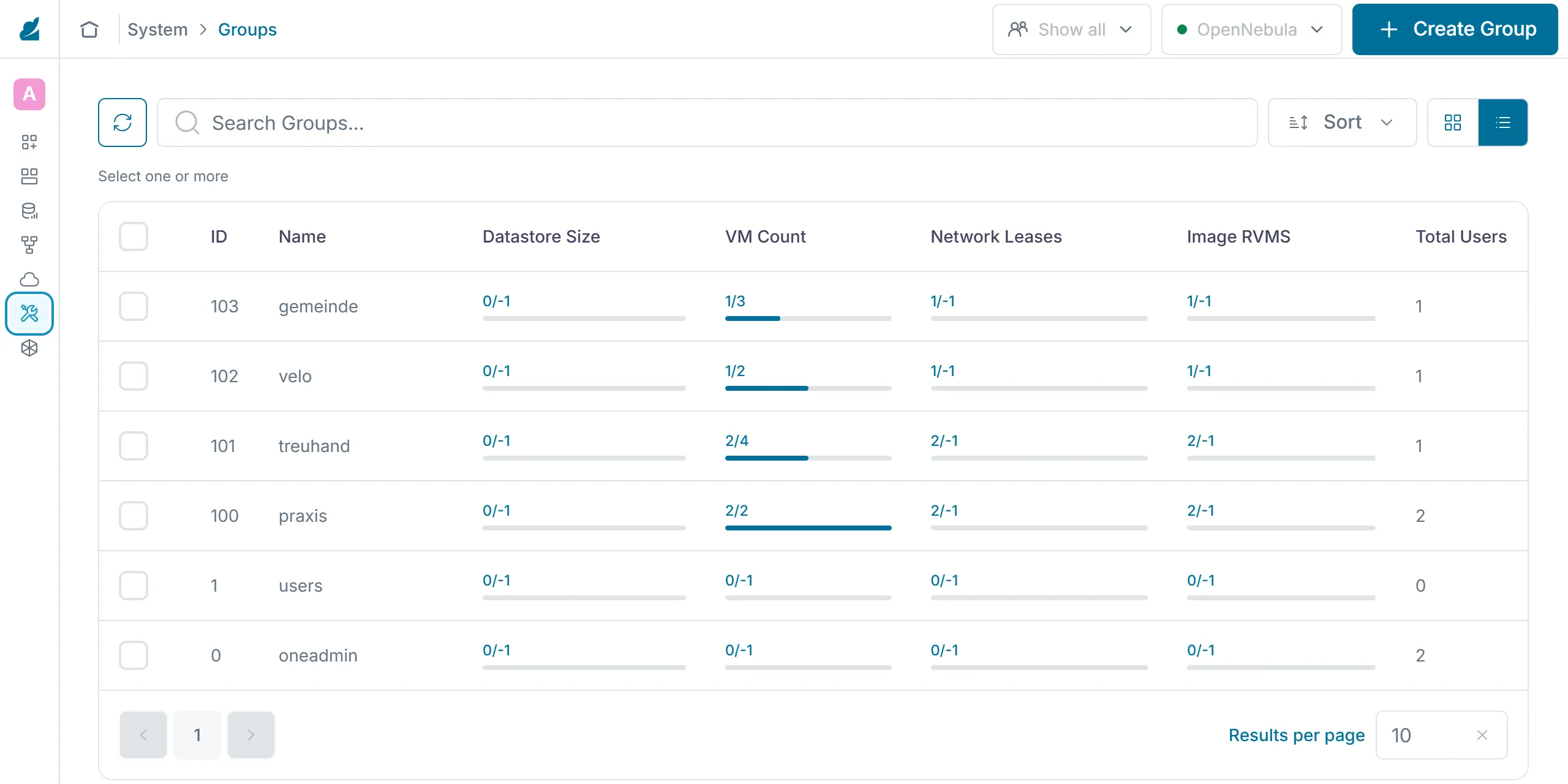
The CPU of the quota counts like CPU in the template. A VM from the template ubuntu needs 0.5 of it. The practice gets 1.5 CPU so that a VM from Sunstone fits next to praxis-1 in chapter 3.4. Sunstone sets the CPU of a new VM to its number of virtual CPUs, which is 1.
For milestone 1 the municipality gets the quota from your personal values. Copy the script, change the line of the municipality and run the copy. The other members keep the values of the table.
cp ~/cc/lab/tenants/set-quotas.sh ~/cc-lab/set-quotas.shnano ~/cc-lab/set-quotas.sh~/cc-lab/set-quotas.shAt the limit
Section titled “At the limit”OpenNebula checks the quota before it creates a VM. If the quota is used up, OpenNebula rejects the request right away and creates no VM. In the lab, starting the practice's third VM gave this message:
[one.template.instantiate] User [2] : group [100] limit of 2 reached for VMS quota in VM.The message names the user, the group, the limit and which quota is reached. The member then deletes a VM or asks the platform team for a larger quota. A quota only applies to new requests. If the platform team lowers it below the current usage, the VMs keep running, but no new ones are added.
Quotas and overcommitment
Section titled “Quotas and overcommitment”A quota limits how much a tenant may reserve. It says nothing about whether the hardware can carry those reservations. Overcommitment means that a node has more reserved than it actually has. In chapter 2.5 a negative value for RESERVED_CPU or RESERVED_MEM allows exactly that. The quotas themselves can be overcommitted too. The sum of all quotas may be larger than the cloud, which works as long as the members do not all use up their quota at the same time.
For CPU, overcommitment carries little risk. When several virtual CPUs share one core, the hypervisor splits the compute time, and all VMs slow down but keep running. The template ubuntu already does this on a small scale. With VCPU = 1 it gives the VM a full virtual core, but with CPU = 0.5 it reserves only half of one. Memory has no such slack. If the VMs together need more memory than the node has, the host has to swap or kill processes, and a VM can crash. This is why CPU is overcommitted more readily than memory. The sum of the memory quotas should match the capacity of the nodes.
A quota also only limits how much is reserved. It does not control how hard a VM actually works its CPU, so on an overcommitted node a VM under full load can slow down the others despite the quotas. Less overcommitment or a separate node helps most against this kind of noisy neighbor.
Quotas in Kubernetes
Section titled “Quotas in Kubernetes”You will meet the same idea again in part 4. A ResourceQuota limits how much CPU and memory all pods of a namespace may request together, much as a group quota limits all VMs of a group. There the namespace plays the role of the group. Kubernetes also distinguishes two values. Requests are reserved, and limits set how much a container may use at most. Chapter 4.5 shows the quota every member gets in the cluster.
Exercise Lab
Set the quotas of the four members. As praxis-admin, start the VM praxis-2 next to praxis-1 from chapter 3.1, then a third VM praxis-3. Write down the message and show the usage with onegroup show praxis.
Solution
set-quotas.sh reports the values of all four members. praxis-2 starts, the third VM fails with "limit of 2 reached for VMS quota in VM". onegroup show praxis shows 2 / 2 for the VMs, 2G / 2G for the memory and 1.0 / 1.50 for the CPU.
Exercise Planning a quota
The bike shop would like a VM with 2 CPU and 2048 MB of memory from a template of its own for Saturdays. Does that fit into its quota? Which quota would you propose, and what does it mean for the other members?
Solution
No, the bike shop's quota only allows 1 CPU. For this VM and a small one next to it, it would need at least 2.5 CPU and 3072 MB. The quotas of all members would then add up to 7 CPU and 11 GB. Both nodes together carry that, but a single node during maintenance no longer does. That is acceptable as long as the bike shop's Saturdays do not coincide with the fiduciary office's month end. The larger quota also belongs in the cost calculation.
Exercise Quota and load
At the end of the month the fiduciary office runs its VMs at full load. The practice reports that its VM responds sluggishly, even though it does not use up its quota and the fiduciary office stays within its own. Explain how this can happen despite quotas, and propose two measures.
Solution
The quotas only limit how much CPU the members reserve. The VMs from ubuntu reserve 0.5 CPU but each have a full virtual CPU. A node with four cores therefore takes up to eight such VMs, so its CPU is overcommitted. When the fiduciary office's VMs work at full load, they share the cores with the practice's VM, and everything slows down. The platform team can reduce overcommitment, for example with CPU = 1 in the fiduciary office's templates or without a negative RESERVED_CPU. It can also move the fiduciary office's VMs to another node. A smaller quota for the fiduciary office does not solve the problem reliably, because even a few VMs under full load slow the node down.
Text and figures are licensed under CC BY-SA 4.0 and the code under the MIT License. The sources are on GitHub.