Platform templates
Assignment
"Gemeinde Hinterbüel heard about the web shop and wants to run its forms on containers too," Simone Wyss writes. "If every member wants that, you can't start from scratch each time. And the municipality must not take the cluster away from the bike shop on a Saturday."
Learning goals
After this chapter you can:
- Explain what a platform template is and what it gives a member
- Limit and separate namespaces with ResourceQuota, LimitRange and NetworkPolicy
- Use one template for several members with Kustomize
- Generate an application for every folder in Git with an ApplicationSet
- Review and accept a member's request as a pull request
Templates
Section titled “Templates”A platform team offers a tested path that other teams follow on their own, often called a golden path. It then no longer has to build an environment by hand for every team. The template defines what every member gets, and the member requests its space instead of waiting for an appointment. In part 3, groups, a VDC and quotas did this job in OpenNebula. In the cluster, namespaces and three kinds of objects take over.
| Part 3 in OpenNebula | Part 4 in Kubernetes |
|---|---|
| group | namespace |
| group quota | ResourceQuota |
size of the template ubuntu | LimitRange |
| VDC and own network | NetworkPolicy |
ResourceQuota
Section titled “ResourceQuota”A ResourceQuota limits what all pods of a namespace may request together.
# Upper limit of the whole namespace, like the quota of the group in OpenNebulaapiVersion: v1kind: ResourceQuotametadata: name: memberspec: hard: requests.cpu: "1" requests.memory: 1Gi limits.cpu: "2" limits.memory: 2Gi pods: "10" services.nodeports: "0" # ServiceLB of k3s would open the port of a LoadBalancer service on every node, even without a node port services.loadbalancers: "0" persistentvolumeclaims: "2"Requests are what the scheduler reserves for a container, like the CPU column of a VM in OpenNebula. Limits are the ceiling a container never exceeds. One CPU is one core, and 250m is a quarter of it. services.nodeports: "0" and services.loadbalancers: "0" stop members from opening their own ports on the nodes. Without the second line, ServiceLB opened a port on both nodes in the lab for a service of type LoadBalancer without a node port. The members' way out is the ingress. The Kubernetes 1.36 documentation on ResourceQuota lists every resource a quota can limit.
LimitRange
Section titled “LimitRange”Once a quota limits CPU and memory, Kubernetes rejects every pod without requests and limits. The LimitRange sets defaults for those and a ceiling per container. The documentation on LimitRange shows how defaults and limits work together.
# Default values for containers without requests and limits, the quota needs themapiVersion: v1kind: LimitRangemetadata: name: memberspec: limits: - type: Container defaultRequest: cpu: 50m memory: 64Mi default: cpu: 250m memory: 128Mi max: cpu: "1" memory: 1GiNetworkPolicy
Section titled “NetworkPolicy”Without a rule, every pod in the cluster can reach every other pod, across namespaces too. A NetworkPolicy defines who may talk to a pod. In k3s, a built-in controller enforces such rules. The documentation on NetworkPolicy describes rules for incoming and outgoing connections.
# Pods of a member accept traffic only from their own namespace and from the ingress of k3s in kube-systemapiVersion: networking.k8s.io/v1kind: NetworkPolicymetadata: name: memberspec: podSelector: {} policyTypes: - Ingress ingress: - from: - podSelector: {} - namespaceSelector: matchLabels: kubernetes.io/metadata.name: kube-systempodSelector: {} means all pods of the namespace. They only accept connections from pods in their own namespace and from kube-system, where Traefik runs. In the lab, a pod in the namespace default got "Connection refused" from the web shop, while a pod in velo reached it. A freshly started pod failed its first two requests, though. After a pod starts, the controller needs a few seconds to add its address to its rules.
kubectl -n default run np-test --rm -i --restart=Never --image=busybox:1.37 -- sh -c "sleep 5; wget -qO- -T 5 http://webshop.velo/healthz"kubectl -n velo run np-test --rm -i --restart=Never --image=busybox:1.37 -- sh -c "sleep 5; wget -qO- -T 5 http://webshop.velo/healthz"The sleep 5 gives the controller time to add the new pod to its rules.
Kustomize
Section titled “Kustomize”Together with a fourth file for the namespace, these three files make up the template in templates/member. Kustomize, which is built into kubectl and Argo CD, assembles the right objects for each member from it without copying the template. The Kustomize guide to components shows how a component gets into a kustomization.
# The template of a member namespace. A folder in members/ sets the namespace, kustomize also renames the Namespace objectapiVersion: kustomize.config.k8s.io/v1alpha1kind: Componentresources: - namespace.yaml - resourcequota.yaml - limitrange.yaml - networkpolicy.yamlA member is a folder in members with a single file. The line namespace sets the namespace of all objects and also renames the template's Namespace object. The bike shop needs more CPU for its web shop than the template gives, so a patch replaces that one value.
# Namespace of Veloatelier Matte, the web shop needs more CPU than the template givesapiVersion: kustomize.config.k8s.io/v1beta1kind: Kustomizationnamespace: velocomponents: - ../../templates/memberpatches: - target: kind: ResourceQuota patch: |- - op: replace path: /spec/hard/requests.cpu value: "2"kubectl kustomize ~/platform/members/veloThe command prints the finished objects without changing anything. Use it to check a member before it lands in Git.
ApplicationSet
Section titled “ApplicationSet”Instead of writing an application for every member, you let an ApplicationSet generate them from a pattern.
# One application per folder in members/, a new member is a new folderapiVersion: argoproj.io/v1alpha1kind: ApplicationSetmetadata: name: members namespace: argocdspec: goTemplate: true generators: - git: repoURL: http://FRONTEND:3000/wolkenwerk/platform.git revision: main directories: - path: members/* # Look for new member folders every minute, the default is three minutes requeueAfterSeconds: 60 template: metadata: name: 'member-{{.path.basename}}' spec: project: default source: repoURL: http://FRONTEND:3000/wolkenwerk/platform.git targetRevision: main path: '{{.path.path}}' destination: server: https://kubernetes.default.svc syncPolicy: automated: prune: true selfHeal: trueThe git generator looks for folders under members in the repo and creates an application member-<folder> for each. When a folder is added, a namespace appears. By default, the ApplicationSet checks every three minutes, and requeueAfterSeconds: 60 shortens that to one minute. The Argo CD 3.5 documentation lists every option of the generator under Git Generator.
kubectl -n argocd get applicationsetskubectl -n argocd get applicationskubectl -n velo get resourcequota,limitrange,networkpolicykubectl -n velo describe resourcequota memberThe municipality's request
Section titled “The municipality's request”The municipality requests its namespace with a pull request. In practice the member works in its own branch or fork. In the lab you play both sides.
cd ~/platformgit switch -c gemeindemkdir -p members/gemeindecat > members/gemeinde/kustomization.yaml <<'EOF'# Namespace of Gemeinde Hinterbüel with the limits of the templateapiVersion: kustomize.config.k8s.io/v1beta1kind: Kustomizationnamespace: gemeindecomponents: - ../../templates/memberEOFkubectl kustomize members/gemeindegit add membersgit commit -m "Namespace for Gemeinde Hinterbüel"git push -u origin gemeindeGitea then offers to open a pull request for the branch gemeinde. As the platform team you review the change and check whether the member only sets its name or also changes the template. A request that changes templates/member affects every member and deserves closer attention. If everything is fine, you merge the pull request and pull the new state. The Gitea 28 documentation describes how to open, review and close a pull request.
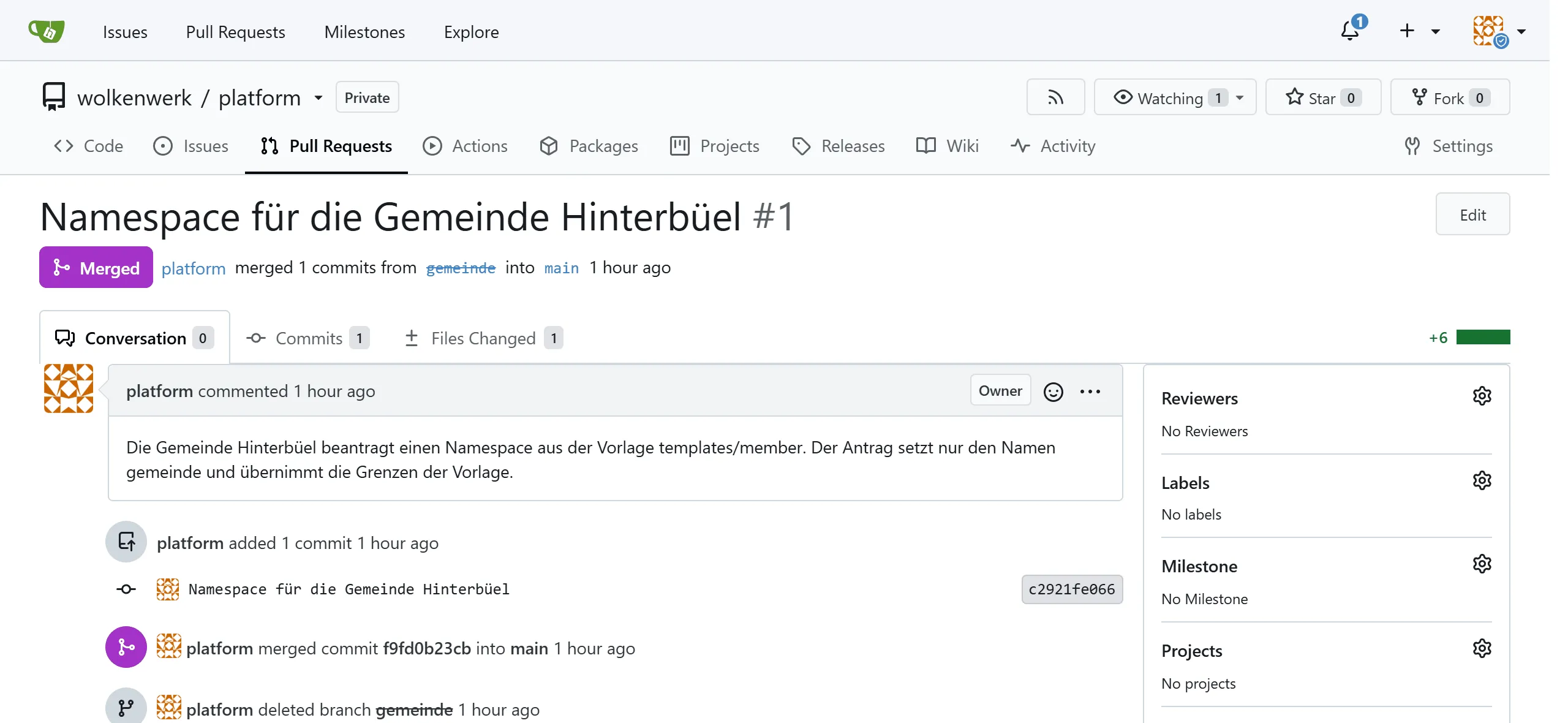
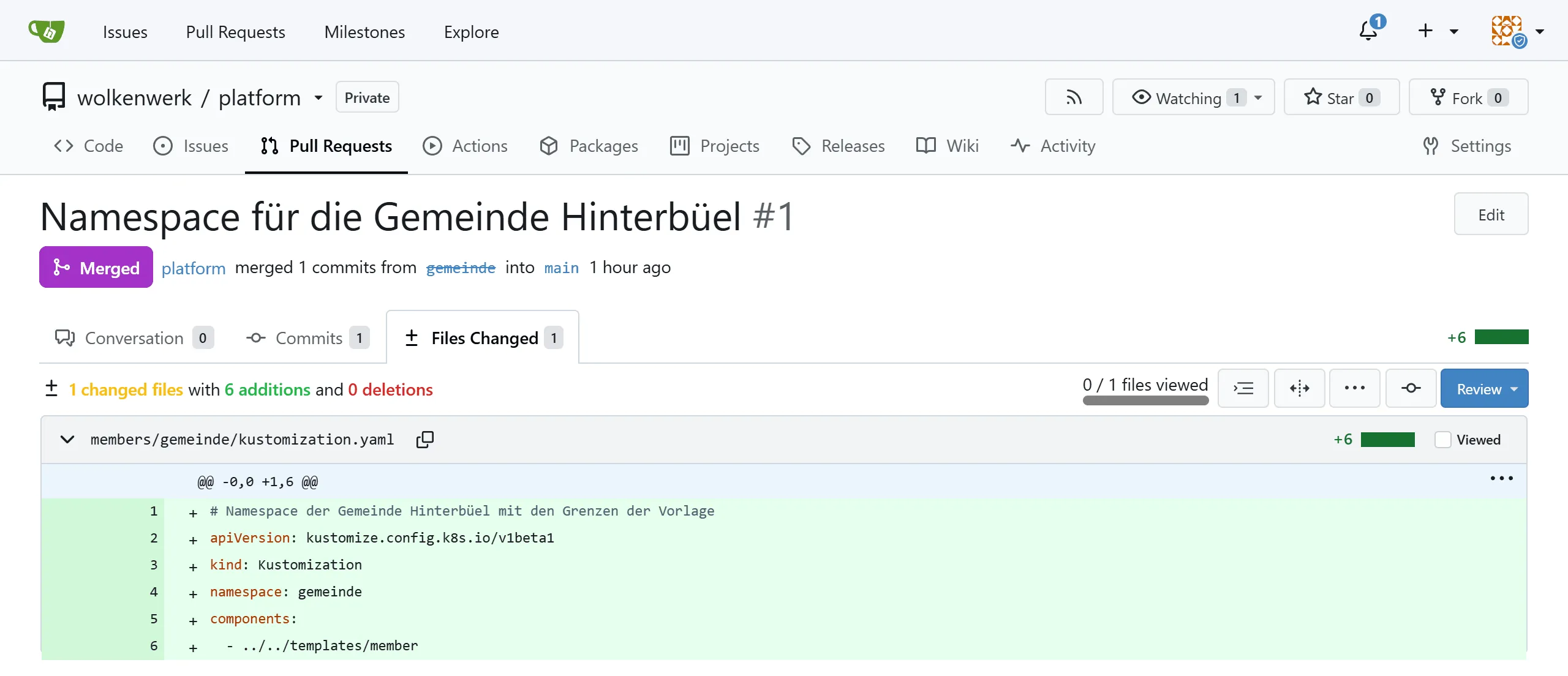
After the merge the pull request shows "Merged" in Gitea, and the "Files Changed" tab shows its diff.
git switch maingit pullkubectl get namespace gemeindekubectl -n argocd get applicationsIn the lab, the namespace gemeinde with its quota, LimitRange and NetworkPolicy was in place ten seconds after the merge. Since the ApplicationSet only looks once a minute, it can also take a good minute. Nobody ran kubectl apply for it.
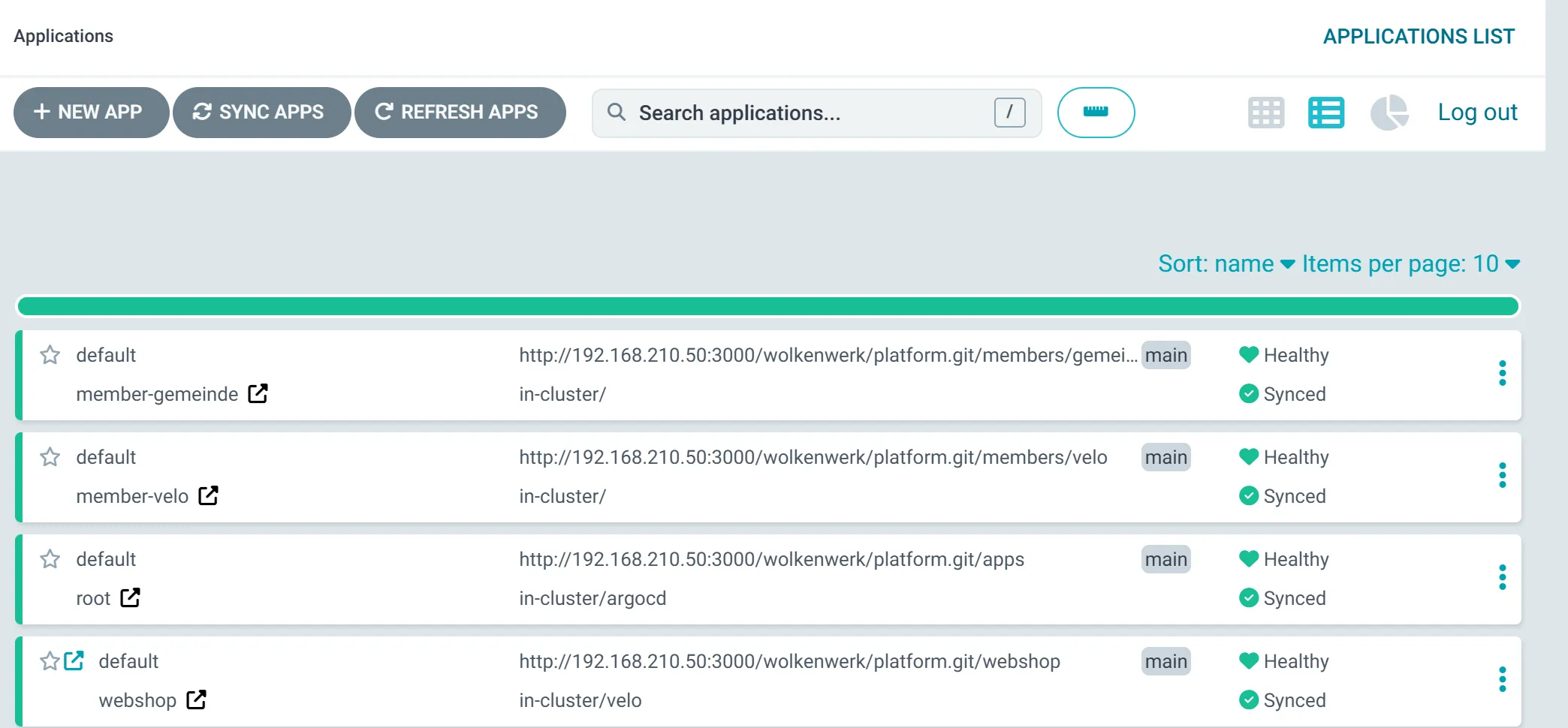
Argo CD then lists the municipality as an application of its own.
For milestone 2 the municipality gets the limits from your personal values. In a second pull request you add a patch to its file as for the bike shop. One patch may hold several operations, one - op: replace each for limits.cpu and for limits.memory. With smaller limits the test below stops earlier, in the lab with 1 CPU already after four pods.
At the limit
Section titled “At the limit”A deployment that asks for too much shows what the quota does.
kubectl -n gemeinde create deployment fill --image=busybox:1.37 --replicas=12 -- sleep 3600kubectl -n gemeinde get deployment fillkubectl -n gemeinde get events --field-selector reason=FailedCreatekubectl -n gemeinde delete deployment fillkubectl -n gemeinde wait --for=delete pod -l app=fill --timeout=60sIn the lab, 8 of 12 pods ran with the values of the template. Each pod got a limit of 250m CPU from the LimitRange, and after eight pods the quota of two CPUs was used up.
Error creating: pods "fill-56886798df-vjq4b" is forbidden: exceeded quota: member, requested: limits.cpu=250m, used: limits.cpu=2, limited: limits.cpu=2As with the quota in OpenNebula, the other members are not affected. The bike shop's web shop keeps running, whatever the municipality starts.
The check of part 4
Section titled “The check of part 4”The check of this part tests the three tools and the two VMs in the OpenTofu state, the cluster with the addresses of its pods, Gitea with the repo, the applications in Argo CD, the web shop behind Traefik and the member namespaces with their quota, LimitRange and NetworkPolicy. Run it on the front-end once the municipality's namespace is in place.
python3 ~/cc/checks/check.py platformExercise Lab
Roll out the template for the bike shop, request the municipality's namespace as a pull request and accept it. Show the quota at its limit and the separation by the NetworkPolicy. Finally run the check platform and add its report to your hand-in repo.
Solution
kubectl -n argocd get applications shows member-velo and member-gemeinde as Synced and Healthy. kubectl -n velo describe resourcequota member shows requests.cpu with a limit of 2, while the municipality has the template's limit of 1. With the values of the template the deployment fill stops at 8 pods, with the limits from your personal values at 4 or 6 pods. A test pod in gemeinde gets "Connection refused" from the web shop in velo. The check ends with "19 of 19 base checks passed".
Exercise Overcommitting
Add up the members' quotas and compare them with what the cluster has. Is it a mistake if the sum is larger?
Solution
With the bike shop and the municipality, the requests add up to 3 CPUs and 2 Gi of memory, the limits to 4 CPUs and 4 Gi. The two VMs have 8 vCPUs and 12 GB, part of which k3s needs itself. A larger sum of limits is not a mistake as long as not everyone hits their limit at once, just like the quotas in chapter 3.2. Overcommitting requests would be riskier, because the scheduler starts no more pods once the reserved values fill the nodes.
Text and figures are licensed under CC BY-SA 4.0 and the code under the MIT License. The sources are on GitHub.