GitOps with Argo CD
Assignment
"Our web shop is supposed to go live in spring," Veloatelier Matte writes. "We'd like to propose changes ourselves, without one of you typing commands on a server in the middle of the night."
Learning goals
After this chapter you can:
- Explain the four principles of GitOps
- Explain why the Git server runs outside the cluster it controls
- Run Gitea on the front-end and share a repo with read-only access
- Install Argo CD and roll out the web shop from Git with applications
- Demonstrate sync and self-heal and explain what prune deletes
GitOps
Section titled “GitOps”With OpenTofu you describe the VMs in code, but you still run the code yourself. With GitOps, software inside the system takes over that part. The CNCF working group OpenGitOps sums it up in four principles.
| Principle | Meaning |
|---|---|
| Declarative | The system is described as a desired state. |
| Versioned and immutable | The desired state is kept in a store that retains every version, usually Git. |
| Pulled automatically | Software inside the system fetches the desired state itself. |
| Continuously reconciled | The same software keeps comparing desired and actual state and corrects differences. |
The difference from a classic rollout is the direction. With a push approach, a pipeline or a person with rights logs in to the cluster and applies changes. With GitOps, nobody but the agent in the cluster needs those rights. Whoever wants a change edits Git, and the Git history doubles as the log of every change.
Gitea on the front-end
Section titled “Gitea on the front-end”Argo CD, the agent of this chapter, needs a Git repo it can reach from the cluster. The platform team runs its own Gitea for that. Gitea is a lightweight Git server with a web interface, users, organizations and pull requests, under the MIT license.
Gitea runs on the front-end, outside the cluster. You rebuild the cluster in chapter 6.2 at the latest, when it moves to etcd, and earlier if you take on advanced task A of chapter 4.6. If the desired state lived in a Gitea inside the same cluster, it would be gone after tofu destroy, and the new cluster would not know what to roll out. The desired state a cluster is rebuilt from therefore does not belong in that cluster. The front-end has enough memory and runs anyway, because OpenNebula needs it.
#!/bin/bash# Installs Gitea on the front-end as a systemd service with SQLite, the Git server of chapter 4.4.# Gitea runs outside the k3s cluster, so that rebuilding the cluster keeps the desired state.##   sudo ~/cc/platform/gitea/install-gitea.sh## The admin "platform" gets a random password, it is stored in ~/cc-lab/gitea/platform.pass of the calling user.set -euo pipefail
VERSION=${GITEA_VERSION:-28.3.0}BIN=/usr/local/bin/gitea# shellcheck source=/dev/nullsource /etc/cc-lab.envOWNER=${SUDO_USER:?run with sudo as your own user}OWNER_HOME=$(getent passwd "$OWNER" | cut -d: -f6)
# Binary with its published checksumurl="https://dl.gitea.com/gitea/$VERSION/gitea-$VERSION-linux-amd64"tmp=$(mktemp -d)curl -fsSL -o "$tmp/gitea" "$url"echo "$(curl -fsSL "$url.sha256" | cut -d' ' -f1)  $tmp/gitea" | sha256sum -c -install -m 0755 "$tmp/gitea" "$BIN"rm -rf "$tmp"
# A system user without login owns the dataid git >/dev/null 2>&1 || adduser --system --shell /bin/bash --group --disabled-password --home /home/git gitinstall -d -o git -g git -m 0750 /var/lib/gitea /var/lib/gitea/custom /var/lib/gitea/data /var/lib/gitea/loginstall -d -o root -g git -m 0770 /etc/gitea
# Configuration without the web installer, HTTP on port 3000 of the front-end, no self-registrationif [ ! -f /etc/gitea/app.ini ]; then  cat > /etc/gitea/app.ini <<INIAPP_NAME = Wolkenwerk GitRUN_USER = gitWORK_PATH = /var/lib/gitea
[server]HTTP_PORT = 3000ROOT_URL = http://$CC_FE_IP:3000/DISABLE_SSH = true
[database]DB_TYPE = sqlite3PATH = /var/lib/gitea/data/gitea.db
[security]INSTALL_LOCK = trueSECRET_KEY = $($BIN generate secret SECRET_KEY)INTERNAL_TOKEN = $($BIN generate secret INTERNAL_TOKEN)
[oauth2]JWT_SECRET = $($BIN generate secret JWT_SECRET)
[service]DISABLE_REGISTRATION = trueREQUIRE_SIGNIN_VIEW = true
[repository]DEFAULT_BRANCH = main
[log]MODE = fileLEVEL = InfoINI  chown root:git /etc/gitea/app.ini  chmod 0640 /etc/gitea/app.inifi
cat > /etc/systemd/system/gitea.service <<UNIT[Unit]Description=GiteaAfter=network.target
[Service]User=gitGroup=gitWorkingDirectory=/var/lib/giteaExecStart=$BIN web --config /etc/gitea/app.iniRestart=alwaysEnvironment=USER=git HOME=/home/git GITEA_WORK_DIR=/var/lib/gitea
[Install]WantedBy=multi-user.targetUNITsystemctl daemon-reloadsystemctl enable --now giteauntil curl -fs -o /dev/null http://localhost:3000/api/healthz; do sleep 2; done
# Admin of the platform team, created oncepass_file="$OWNER_HOME/cc-lab/gitea/platform.pass"if [ ! -f "$pass_file" ]; then install -d -o "$OWNER" -g "$OWNER" -m 0700 "$OWNER_HOME/cc-lab" "$OWNER_HOME/cc-lab/gitea" pass=$(openssl rand -hex 16) sudo -u git "$BIN" --config /etc/gitea/app.ini admin user create --admin --username platform \ --email platform@wolkenwerk.example --password "$pass" --must-change-password=false install -o "$OWNER" -g "$OWNER" -m 0600 /dev/null "$pass_file" echo "$pass" > "$pass_file"fiecho "Gitea $VERSION runs on http://$CC_FE_IP:3000/, user platform, password in $pass_file"sudo ~/cc/platform/gitea/install-gitea.shThe script verifies the checksum of the program, creates the system user git and writes the configuration itself, so no install wizard in the browser is needed. Gitea stores its data in SQLite and runs as a systemd service. The Gitea 28 documentation explains these steps under Installation from binary. Nobody can sign up on their own, and without signing in you see nothing. In the browser of the client (the Kali VM on smartlearn, your PC with your own hypervisor), Gitea is on port 3000 of the front-end. You sign in as platform with the password from ~/cc-lab/gitea/platform.pass.
The repo platform
Section titled “The repo platform”A second script creates the organization wolkenwerk, the private repo platform and two tokens.
#!/bin/bash# Creates the organisation wolkenwerk and its private repo platform in Gitea, and a token that may only read it.##   ~/cc/platform/gitea/make-repo.sh## The token for Argo CD is stored in ~/cc-lab/gitea/argocd.token, the token of the platform team in platform.token.set -euo pipefail
# shellcheck source=/dev/nullsource /etc/cc-lab.envAPI="http://$CC_FE_IP:3000/api/v1"DIR=~/cc-lab/giteaAUTH="platform:$(cat "$DIR/platform.pass")"
api() {  curl -fsS -u "$AUTH" -H "Content-Type: application/json" "$@"}
# Organisation and repo, both only onceapi -o /dev/null "$API/orgs/wolkenwerk" 2>/dev/null ||  api -o /dev/null -X POST "$API/orgs" -d '{"username": "wolkenwerk", "visibility": "private"}'api -o /dev/null "$API/repos/wolkenwerk/platform" 2>/dev/null ||  api -o /dev/null -X POST "$API/orgs/wolkenwerk/repos" -d '{"name": "platform", "private": true, "default_branch": "main"}'
# Tokens are shown only once, so they are written right awaytoken() {  local name=$1 scopes=$2 file="$DIR/$1.token"  [ -f "$file" ] && return  install -m 0600 /dev/null "$file"  api -X POST "$API/users/platform/tokens" -d "{\"name\": \"$name\", \"scopes\": $scopes}" |    python3 -c 'import json, sys; print(json.load(sys.stdin)["sha1"])' > "$file"}token platform '["write:repository", "write:organization"]'token argocd '["read:repository"]'
echo "Repo http://$CC_FE_IP:3000/wolkenwerk/platform.git, tokens in $DIR"~/cc/platform/gitea/make-repo.sh| Token | Rights | Used by |
|---|---|---|
platform.token | write repos and the organization | you, when pushing |
argocd.token | read repos | Argo CD |
Argo CD only gets read access. If its token ends up in the wrong place, nobody can use it to change the desired state. The API usage guide of Gitea 28 shows how tokens and their rights are created through the API.
Since chapter 4.2, ~/platform holds the template. The files for Argo CD contain the placeholder FRONTEND, which you replace with the address of your front-end. Then you turn the folder into a Git repo and push it to Gitea.
source /etc/cc-lab.envcd ~/platformsed -i "s#http://FRONTEND:3000#http://$CC_FE_IP:3000#" root.yaml apps/*.yamlgit init -b maingit config user.name "Platform team"git config user.email "platform@wolkenwerk.example"git config credential.helper storeprintf 'http://platform:%s@%s:3000\n' "$(cat ~/cc-lab/gitea/platform.token)" "$CC_FE_IP" > ~/.git-credentialschmod 600 ~/.git-credentialsgit add .git statusgit commit -m "Platform of Wolkenwerk Bern"git remote add origin "http://$CC_FE_IP:3000/wolkenwerk/platform.git"git push -u origin mainBefore the commit, git status shows no OpenTofu state, because .gitignore keeps it out. After the push, Gitea shows the folders tofu, apps, webshop, templates and members.
The web shop
Section titled “The web shop”The bike shop's web shop is a small Python program that only uses the standard library. It lives in the course repo under case/webshop/.
| Path | Answer |
|---|---|
/ | the shop page with the bikes |
/api/products | the products as JSON |
/healthz | ok, for the Kubernetes probes |
/metrics | requests and response times in the Prometheus format, the topic of part 5 |
The CI of the course repo builds an image from it and publishes it to the GitHub container registry as ghcr.io/ndum/cc/webshop:1.0.0. The image is based on the official python:3.14-slim image and runs as an unprivileged user.
FROM docker.io/library/python:3.14-slim
LABEL org.opencontainers.image.title="webshop" \      org.opencontainers.image.description="Web shop of Veloatelier Matte for the course CC" \      org.opencontainers.image.source="https://github.com/ndum/cc" \      org.opencontainers.image.licenses="MIT"
# tini runs as the first process and passes signals on. Python is then an ordinary process and stops# on SIGTERM even while it is still starting, before the shop has set its own handlerRUN apt-get update && DEBIAN_FRONTEND=noninteractive apt-get install -y --no-install-recommends tini \    && rm -rf /var/lib/apt/lists/*
WORKDIR /appCOPY app.py load.py ./
# The shop runs as an unprivileged user, Kubernetes checks this with runAsNonRootUSER 10001ENV PYTHONUNBUFFERED=1 PORT=8080EXPOSE 8080ENTRYPOINT ["/usr/bin/tini", "--"]CMD ["python3", "/app/app.py"]
In the platform repo, three files describe the shop in the cluster.
apiVersion: apps/v1kind: Deploymentmetadata: name: webshop labels: app: webshopspec: replicas: 2 selector: matchLabels: app: webshop template: metadata: labels: app: webshop spec: securityContext: runAsNonRoot: true containers: - name: webshop image: ghcr.io/ndum/cc/webshop:1.0.0 imagePullPolicy: IfNotPresent ports: - name: http containerPort: 8080 env: - name: SHOP_NAME value: Veloatelier Matte resources: requests: cpu: 50m memory: 64Mi limits: cpu: 500m memory: 128Mi readinessProbe: httpGet: path: /healthz port: http timeoutSeconds: 3 livenessProbe: httpGet: path: /healthz port: http # A busy pod may need longer than the default second, a failed liveness check restarts it timeoutSeconds: 3The deployment keeps two pods running and gives them requests and limits for CPU and memory. The probes call /healthz. A pod only receives requests once its readiness probe answers, and Kubernetes restarts it when the liveness probe fails. The service webshop gives the pods a fixed name, and the ingress tells Traefik to forward requests on port 80 of both VMs to the service.
Argo CD
Section titled “Argo CD”Argo CD is a CNCF project and runs as a set of controllers in the cluster. It reads repos, renders the manifests, with Kustomize or Helm as well, compares them with the cluster and reconciles. An application tells it which folder of which repo belongs in which namespace.
A script installs Argo CD with Helm, stores the token for Gitea and applies the first application. The chart argo-cd in version 10.11.6 ships Argo CD 3.5. Its README explains the values of the chart.
#!/bin/bash# Installs Argo CD in a new k3s cluster and connects it to the platform repo in Gitea, chapter 4.4.# After this step Argo CD builds everything else from Git.##   ~/cc/platform/bootstrap-argocd.shset -euo pipefail
CHART_VERSION=${ARGOCD_CHART_VERSION:-10.11.6}# shellcheck source=/dev/nullsource /etc/cc-lab.envREPO="http://$CC_FE_IP:3000/wolkenwerk/platform.git"HERE=$(dirname "$(readlink -f "$0")")
helm repo add argo https://argoproj.github.io/argo-helm >/dev/nullhelm repo update argo >/dev/nullhelm upgrade --install argocd argo/argo-cd --version "$CHART_VERSION" \  --namespace argocd --create-namespace -f "$HERE/argocd/values.yaml" --wait --timeout 10m
# Read access to the repo, the token comes without a line break, otherwise Gitea refuses itkubectl -n argocd create secret generic repo-platform \  --from-literal=type=git \  --from-literal=url="$REPO" \  --from-literal=username=platform \  --from-literal=password="$(tr -d '\n' < ~/cc-lab/gitea/argocd.token)" \  --dry-run=client -o yaml |  kubectl label --local -f - argocd.argoproj.io/secret-type=repository -o yaml |  kubectl apply -f -
kubectl apply -f ~/platform/root.yaml# The password goes to a file instead of the terminal, so it does not end up in a screenshot(umask 077; kubectl -n argocd get secret argocd-initial-admin-secret -o jsonpath='{.data.password}' | base64 -d > ~/cc-lab/argocd-admin.pass)echo "Argo CD runs, UI on http://$CC_K3S_SERVER_IP:30080/, user admin, password in ~/cc-lab/argocd-admin.pass"# Values of the Helm chart argo-cd for the lab, chapter 4.4
# Login with the admin of Argo CD only, no single sign-on and no notificationsdex: enabled: falsenotifications: enabled: false
configs: params: # The lab has no certificate, the UI answers over HTTP server.insecure: true cm: # Check Git every minute instead of every three minutes, so that changes show up quickly in class timeout.reconciliation: 60s
server: service: type: NodePort nodePortHttp: 30080 nodePortHttps: 30443~/cc/platform/bootstrap-argocd.shkubectl -n argocd get podskubectl -n argocd get applicationsThe token reaches Argo CD as a secret with the label argocd.argoproj.io/secret-type=repository. In the lab, a first attempt with kubectl create secret --from-file failed. The secret contained the line break at the end of the file, and Gitea answered "authentication required". The script therefore strips the line break first.
App of apps
Section titled “App of apps”The first application is called root. It points to the folder apps in the repo, which holds more applications.
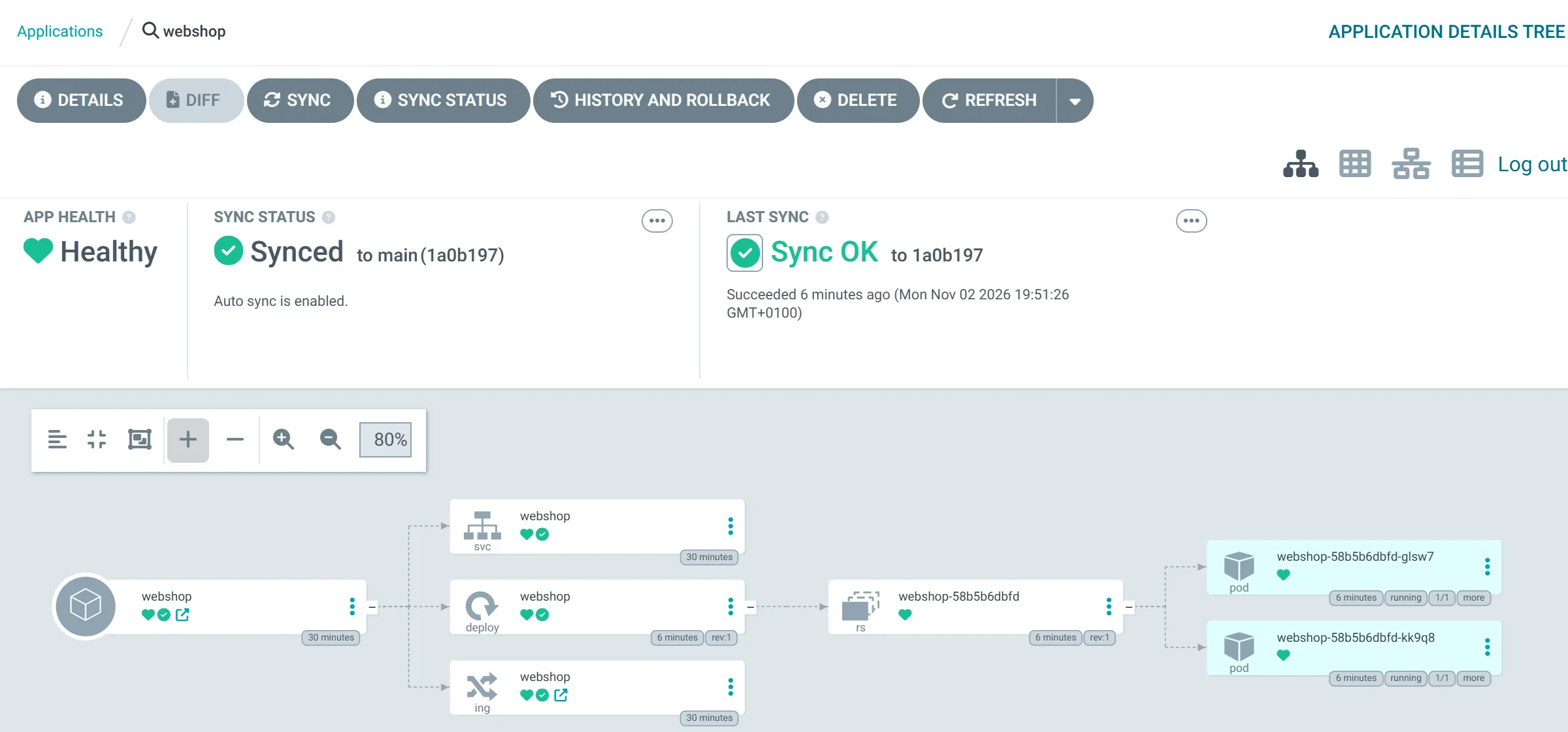
# The root application, it deploys every application in apps/ of the platform repo, apply it once with kubectlapiVersion: argoproj.io/v1alpha1kind: Applicationmetadata: name: root namespace: argocdspec: project: default source: repoURL: http://FRONTEND:3000/wolkenwerk/platform.git targetRevision: main path: apps destination: server: https://kubernetes.default.svc namespace: argocd syncPolicy: automated: prune: true selfHeal: true# The web shop of Veloatelier Matte in the namespace veloapiVersion: argoproj.io/v1alpha1kind: Applicationmetadata: name: webshop namespace: argocdspec: project: default source: repoURL: http://FRONTEND:3000/wolkenwerk/platform.git targetRevision: main path: webshop destination: server: https://kubernetes.default.svc namespace: velo syncPolicy: automated: prune: true selfHeal: true syncOptions: - CreateNamespace=trueArgo CD first rolls out root and finds the application webshop in it, which brings the folder webshop into the namespace velo. Adding an application only takes a new file in apps, and you no longer need kubectl for it. This pattern is called app of apps. The Argo CD 3.5 documentation describes it under Cluster Bootstrapping.
| Setting | Effect |
|---|---|
automated | Argo CD reconciles without a click as soon as Git changes |
prune: true | whatever disappears from Git, Argo CD also deletes in the cluster |
selfHeal: true | whatever someone changes in the cluster by hand, Argo CD resets to the state in Git |
CreateNamespace=true | Argo CD creates the namespace if it is missing |
The Argo CD 3.5 documentation describes automated sync, prune and self-heal under Automated Sync Policy. In the lab, all applications were Synced and Healthy 5 to 15 seconds after the bootstrap. Here Argo CD polls Gitea every minute, as set by timeout.reconciliation in the values. Without that setting, the interval would be three minutes.
In its web interface, Argo CD shows each application as a tree of its objects.
Access from the client
Section titled “Access from the client”The cluster sits in the internal network cc-net, which only the front-end can reach. So that the browser of the client can open Argo CD and the web shop, you forward two ports through SSH in the terminal of the client. The addresses come from your parameters. The ssh manual describes the option -L.
ssh -L 8080:<server-address>:30080 -L 8081:<server-address>:80 mmuster-feWhile the connection is open, http://localhost:8080/ shows the Argo CD interface and http://localhost:8081/ the web shop. In Argo CD you sign in as admin with the password from ~/cc-lab/argocd-admin.pass, where the script stored it. Gitea is reachable directly on port 3000 of the front-end until the firewall of chapter 6.1 closes the port from outside.
Showing reconciliation
Section titled “Showing reconciliation”You see self-heal fastest when you change the cluster without going through Git.
kubectl -n velo scale deployment webshop --replicas=4kubectl -n velo get deployment webshopkubectl -n velo delete deployment webshopkubectl -n velo get deployment webshopIn the lab the deployment was back to two pods after about a second on the first try, and the two extra pods had stopped after two seconds. The deleted deployment returned after one to three seconds, and its pods ran a few seconds later. After the signal to stop, a web shop pod still answers requests for two seconds, so Traefik can take it off its list before it stops. If you repeat it, Argo CD waits a little longer each time, so that self-heal and a person do not take turns forever. In the lab the deployment only came back after 15 seconds on the third try. A change through Git takes longer, because Argo CD only learns about it at its next poll.
cd ~/platformsed -i 's/replicas: 2/replicas: 3/' webshop/deployment.yamlgit commit -am "Web shop with three pods for the season"git pushIn the lab the third pod was running 40 seconds to a good two minutes after the push, because Argo CD polls every minute and shifts each poll by a random amount. A webhook from Gitea to Argo CD would trigger the sync at once. For the lab, polling every minute is enough.
Exercise Lab
Install Gitea, create the repo, roll out Argo CD and open the web shop and Argo CD in the browser of the client. Change the number of pods through Git.
Solution
kubectl -n argocd get applications shows root, webshop and member-velo as Synced and Healthy. member-velo already comes with the first push, chapter 4.5 explains it. The web shop shows the bikes and, at the bottom, the name of the pod that answered. After a push with replicas: 3, kubectl -n velo get pods shows three pods after a good two minutes at most, and Argo CD shows the new commit on the application.
Exercise Back to the old state
The new version with three pods was a mistake. How do you restore the old state without using kubectl?
Solution
git revert HEAD creates a commit that undoes the last change, and git push sends it to Gitea. Argo CD reconciles at its next poll and removes the third pod. The mistake and its correction both stay visible in the Git history.
Exercise Rights
Who still needs write access to the cluster after this chapter, and what does that mean for the kubeconfig on the front-end?
Solution
For day-to-day operation only Argo CD, everything else goes through Git. You need the kubeconfig with full rights for the bootstrap, for troubleshooting and in an emergency. A team would give it to few people and create read-only accounts for everyday work.
Text and figures are licensed under CC BY-SA 4.0 and the code under the MIT License. The sources are on GitHub.