Showback
Assignment
"The board wants to know what every member uses," Beat Kläy writes. "We don't charge anything yet, but every member should see its costs."
Learning goals
After this chapter you can:
- Tell showback and chargeback apart
- Store prices per resource in a template
- Calculate and read the costs of the members with
oneshowback - Work out the cost of a VM per hour and per month yourself
- Check with a simple cost model whether the prices cover the costs
Showback and chargeback
Section titled “Showback and chargeback”Anyone who shares a cloud wants to know who uses how much of it. There are two approaches. Showback shows every business unit what it has used, without any money changing hands. Chargeback charges this usage to the unit's budget. Showback comes first, because only when the numbers are right and everybody understands them can you base an invoice on them. Whether an organization introduces chargeback afterwards depends on its accounting.
Wolkenwerk Bern starts with showback. The members see their costs every month, and the board decides later how the cooperative charges them.
Prices in the template
Section titled “Prices in the template”OpenNebula works with three hourly prices stored in the template. CPU_COST applies per CPU of the template, MEMORY_COST per MB of memory and DISK_COST per MB of disk. The prices in the lab are made up for the case and are meant in Swiss francs. The showback documentation describes how to set the prices of a template.
# Prices for showback per hour, chapter 3.3. The amounts are invented for the case.##   onetemplate update ubuntu --append ~/cc/lab/tenants/costs.tpl
# per CPU of the template and hourCPU_COST = "0.05"# per MB of memory and hourMEMORY_COST = "0.00002"# per MB of disk and hourDISK_COST = "0.000001"onetemplate update ubuntu --append ~/cc/lab/tenants/costs.tplonetemplate show ubuntu | grep COSTA VM takes the prices from the template when it starts. VMs that were started earlier therefore cost nothing, and a reboot with onevm reboot does not change that. In the lab you terminate the members' VMs with onevm terminate after adding the prices and start them again from the template.
Calculating costs
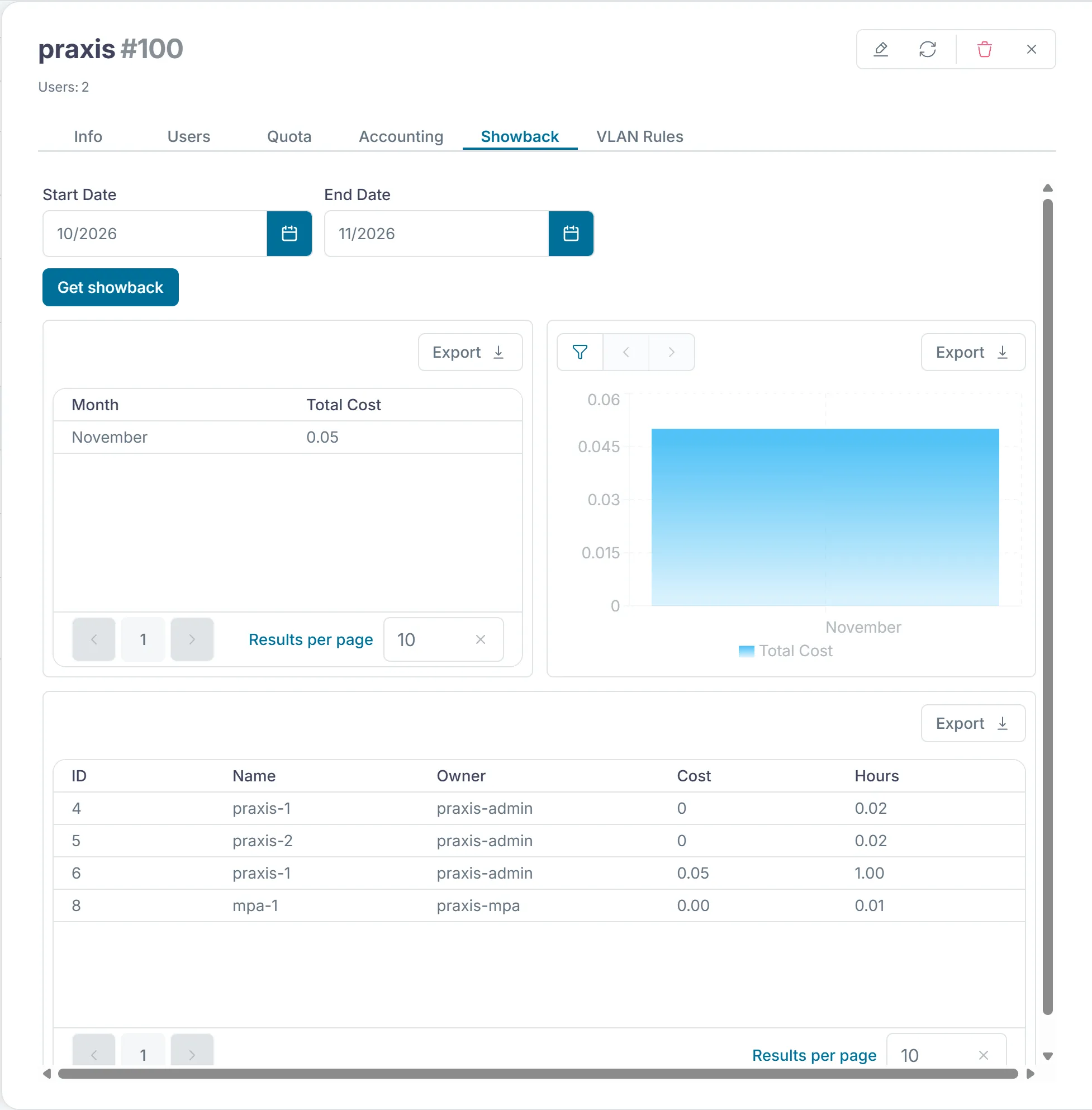
Section titled “Calculating costs”oneshowback calculate calculates the costs of all VMs from their running time and stores them per month. OpenNebula ships the timer opennebula-showback.timer, which runs this calculation every day. For the exercises you start it yourself so that you do not have to wait until midnight. oneshowback list then shows owner, group, month, hours, running time and cost per VM. With -g you only see one member. The guide to the monthly reports shows how to calculate and retrieve single months.
oneshowback calculateoneshowback listoneshowback list -g treuhandoneshowback list --csv > ~/cc-lab/showback.csvWith oneshowback list a group admin only sees the VMs of their own group. Each member can therefore check its own costs without seeing those of the others.
Sunstone shows the costs in the "Showback" tab of a group.
The cost of a VM
Section titled “The cost of a VM”A VM from the template ubuntu has 0.5 CPU, 1024 MB of memory and a disk of 3584 MB. Per hour it costs
0.5 × 0.05 + 1024 × 0.00002 + 3584 × 0.000001 = 0.025 + 0.0205 + 0.0036 ≈ 0.049Over 30 days, or 720 hours, that comes to about 35 francs. The cost follows the time a VM holds resources on a host. A VM switched off with onevm poweroff therefore keeps costing. Only onevm undeploy takes it off the host, and then it costs nothing in this model. It pays for the members to take VMs they do not need for a while off the host that way.
In the end the prices have to cover the cooperative's costs. These include the hardware over its lifetime, power, licenses, backup and the work of the platform team, as well as the reserve for maintenance from chapter 2.5. A simple approach divides the yearly costs by the capacity that can be sold in a year. Chapter 6.4 works with all the costs, and advanced task C of milestone 4 does the same for a member of your own. In advanced task B you work out from a monthly report how far the prices cover the cooperative's costs.
Exercise Lab
Add the prices to the template. As praxis-admin, terminate the VM praxis-1 with onevm terminate and start it again from the template under the same name. Also start the VM treuhand-1 as treuhand-admin. Calculate the showback after one hour, and carry on with chapter 3.4 in the meantime. Export the list as CSV to ~/cc-lab/showback.csv and capture it in a screenshot for milestone 1.
Solution
onetemplate show ubuntu shows CPU_COST, MEMORY_COST and DISK_COST. After oneshowback calculate, oneshowback list lists the new VMs with about one hour and costs around 0.05. The old VMs without prices appear with cost 0.
Exercise Cost model
The two nodes cost 7,000 francs together and run for five years. Power, backup and work cost 6,000 francs a year. On average 10 VMs from the template ubuntu are in use. Do the lab prices cover the costs? What would you propose to the board?
Solution
The costs per year are 7,000 / 5 + 6,000 = 7,400 francs. 10 VMs at 35 francs a month bring in 4,200 francs a year. So the prices cover only a little more than half. Either the prices go up to about 1.8 times their current level, or utilization has to grow. A fixed base fee per member for the work of the platform team would be another option.
Text and figures are licensed under CC BY-SA 4.0 and the code under the MIT License. The sources are on GitHub.